








如何针对视频购物广告设置你的移动度量合作伙伴
事前须知:此功能仅面向可创建视频购物广告(商品库)的市场的托管账户。如需了解更多信息,请联系你的销售代表。
借助视频购物广告(商品库)推广目标,应用广告主能够触达相关受众,从而增加应用下载量和转化量。应用广告主可以通过定向于执行特定应用内事件的用户来触达相关受众。
例如,你可以使用再营销来投放一则广告,展示某人在你的应用中加入购物车的确切商品。
要使用此功能,你需要配置你的移动测量合作伙伴 (MMP) 来与 TikTok 广告管理平台集成。本文将指导你完成设置 MMP 的过程,并提供来自 Branch、Singular、Adjust 和 AppsFlyer 的回传事件的一个示例数据结构。
概览
通常,配置 MMP 以与 TikTok 广告管理平台集成有四个步骤。请注意,不同的第三方测量平台的这些步骤可能略有不同。
将 3 类事件(查看内容、加入购物车和购买)添加到 MMP 中,并将这些事件回传到 TikTok 广告管理平台。
在 MMP 上映射各类事件的必填字段。
在你的 MMP 上启用完全事件数据传输。
授予对 MMP 的读取权限或向 TikTok 销售代表发送屏幕截图。
请观看下面的视频,快速了解所需步骤。
事件类型
要将 MMP 与 TikTok 的视频购物广告(商品库)完全集成,你需要在 MMP 中添加 3 类回传事件。
TikTok 事件:代码 | Branch | Singular | Adjust | AppsFlyer |
|---|---|---|---|---|
ViewContent:29 | VIEW_CONTENT(查看内容) | ViewContent(查看内容) | View content(查看内容) | View_content(查看内容) |
AddToCart:22 | ADD_TO_CART(加入购物车) | AddToCart(加入购物车) | Add to cart(加入购物车) | Add_to_cart(加入购物车) |
Purchase:2 (Checkout:20) | PURCHASE(购买) | Purchase(购买) | Pay(支付) | Pay(支付) |
除了添加这些事件外,你还可以将所有事件回传到 TikTok 广告管理平台。我们建议这样做,因为这将有助于广告投放。
注意:当你在 MMP 中选择“支付”或“购买”事件并将其发送回 TikTok 广告管理平台时,我们将在我们的内部数据库中为该事件保存 2 条记录。一条标记为“购买”,另一条标记为“结账”。这是一个内部流程,不会影响任何功能。
数据结构示例
必填字段
字段名称 | 位置 | 描述 | 备注 |
|---|---|---|---|
event | 事件名称 | 请参见“事件类型”部分。MMP 会将其发布到 TikTok。 | |
content_id(内容 ID) | properties.contents | Sku_id 或 spu_id | 强制性要求:广告主必须在 TikTok 的 MMP 中映射。 |
content_type(内容类型) | properties.contents | 值应当为“product”或“product_group” | 强制性要求:广告主必须在 TikTok 的 MMP 中映射。 |
quantity(数量) | properties.contents | 订单中的商品数量 | 可选性建议:广告主应当在 TikTok 的 MMP 中映射。 |
price(价格) | properties.contents | 单件商品的价格 | 可选性建议:广告主应当在 TikTok 的 MMP 中映射。 |
currency(币种) | properties | 币种 | 可选性建议:广告主应当在 TikTok 的 MMP 中映射。 |
value(值) | properties | 订单的总价 | 可选:广告主应当在 TikTok 的 MMP 中映射。 |
app_id(应用 ID) | context.app | 应用 ID | 对于应用事件:MMP 会将其发布到 TikTok。 |
pixel_id(Pixel ID) | context.pixel | Pixel ID | 对于 Pixel 事件:MMP 会将其发布到 TikTok。 |
idfa | context.device.idfa | IDFA | 对于 iOS 应用:MMP 会将其发布到 TikTok。 |
gaid | context.device.gaid | GAID | 对于 Android:MMP 会将其发布到 TikTok。 |
platform(平台) | context.device.platform | iOS/Android | MMP 会将其发布到 TikTok。 |
email(电子邮件) | context.user | 电子邮件 | 可选:对于 Pixel 事件,广告主可以通过 SDK 或 API 将其传递给 TikTok。 |
phone_number(电话号码) | context.user | 电话号码 | 可选:对于 Pixel 事件,广告主可以通过 SDK 或 API 将其传递给 TikTok。 |
timestamp(时间戳) | 回传时间 | MMP 会将其发布到 TikTok。 |
注意:你还可以将其他字段传递至 TikTok 广告管理平台。TikTok 广告管理平台将收集并存储传回给它的其他任何字段,以备将来使用。
标准示例数据
应用事件
JSON
1.{2. "eventEnum": "29",3. "event":"ViewContent",4. "properties": {5. "contents":[6. {7. "content_type":"stri", 8. "quantity":1, 9. "content_id":"1077218", 10. "price":8 11. },12. {13. "content_type":"stri",14. "quantity":1,15. "content_id":"1077218",16. "price":817. }18. ],19. "currency":"USD",20. "value":16.00, 21. "query":"The text string that was searched for",22. "description" : "" 23. },24. "context": {25. "ad": {26. ......27. },28. "app": {29. "id": "{app_id}",30. "name" :"",31. "namespace":"",32. "version" :"app_version"33. },34. "device": { 35. "platform": "iOS / Android",36. "idfa": "2A5E62C7-F1C0-40C4-B232-39CE243325C2",37. "idfv": "3D06F4AE-3826-4AC8-8241-541C92B9943E",38. "gaid": "",39. "imei": "",40. "android_id": ""41. },42. ......43. "ip": "{ip}",44. "userAgent": "{ua}"45. },46. "timestamp": "2019-06-12T19:11:01.152Z"47.}
Pixel 事件
JSON
1.{2. "event":"ViewContent",3. "context":{4. "ad":{5. .......6. },7. "Pixel":{8. "code":"BEB7A51TE4MDGLOLEN40"9. },10. "user":{11. "email":"example.bytedance.com", 12. "phone_number":"3243242342"13. },14. ......15. },16. "properties": {17. "contents":[18. {19. "content_type":"stri",20. "quantity":1,21. "content_id":"1077218",22. "price":823. },24. {25. "content_type":"stri",26. "quantity":1,27. "content_id":"1077218",28. "price":829. }30. ],31. "currency":"USD",32. "value":16.00,33. "query":"The text string that was searched for",34. "description" : "" 35. },36. "timestamp":"2019-06-12T19:11:01.152Z"37.}
如何处理 content_id
应用名称 | 如何处理 content_id |
Branch | Branch 提供标准回传模板,该模板定义所有字段映射,例如将“$sku”映射到 content_id。然后 TikTok 将根据该模板将“$sku”映射到“content_id”。 |
Singular | 用户可以使用回传模板对属性进行自定义、将特定字段映射到 content_id 并发送到 TikTok 平台。 |
Adjust | 为用户提供用于添加属性映射的 UI,它可以将特定字段映射到 content_id 并发送到 TT 平台。 |
AppsFlyer | 用户必须使用“af_content_id”,并且不能更改它。TT 端将处理此字段并自动将其映射到“content_id”。 |
MMP 设置示例
Branch
1. 确认已添加 PURCHASE(购买)、ADD_TO_CART(加入购物车)、VIEW_CONTENT(查看内容)事件并已将这些事件传递到 TikTok 广告管理平台。
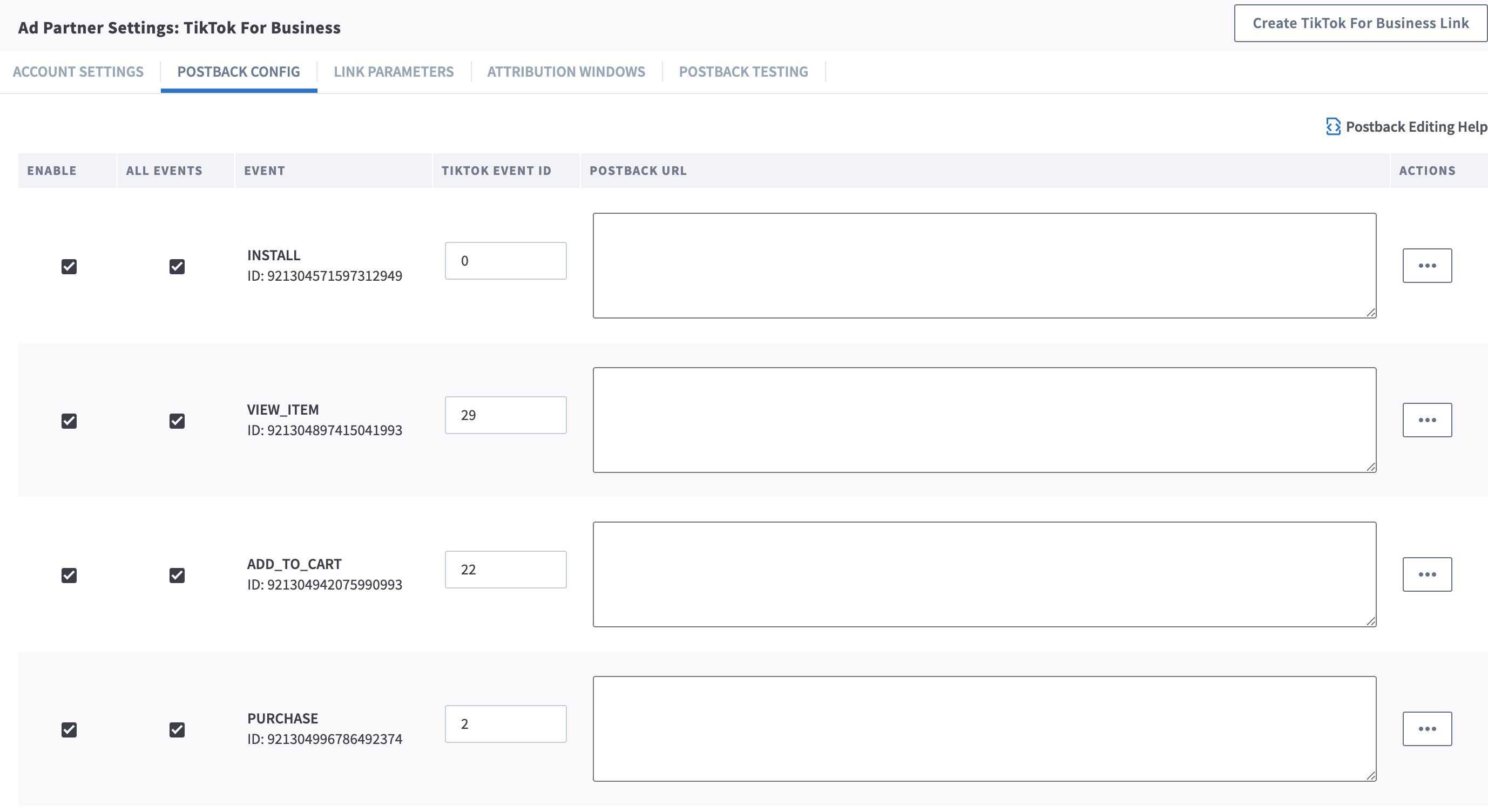
2. 确认 content_id(内容 ID)将在事件属性中传递至 TikTok 广告管理平台。你可以使用回传模板对属性进行自定义、将特定字段映射到 content_id 并发送到 TikTok 广告管理平台。
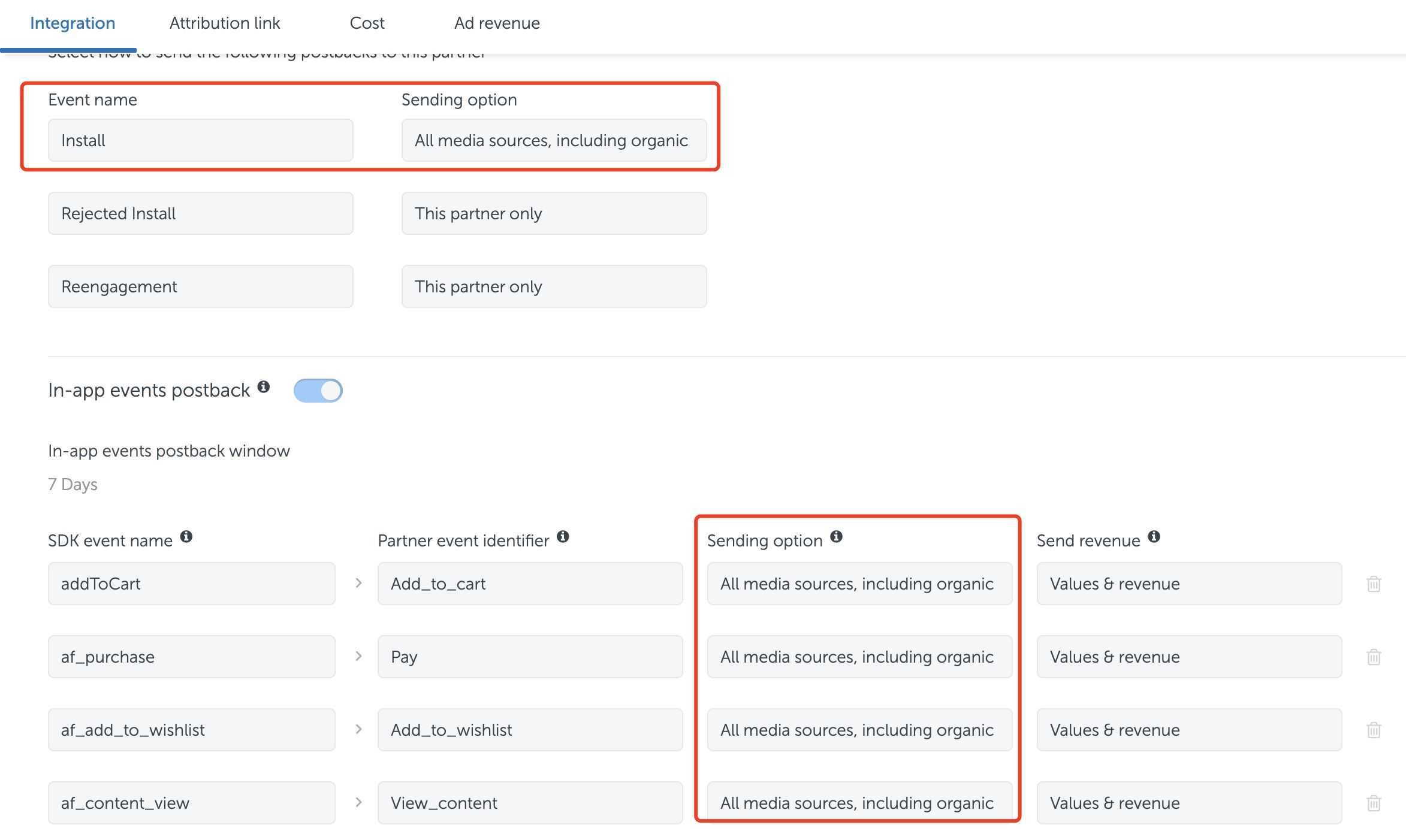
3. 选中所有事件,将所有事件数据发送到 TikTok 广告管理平台。
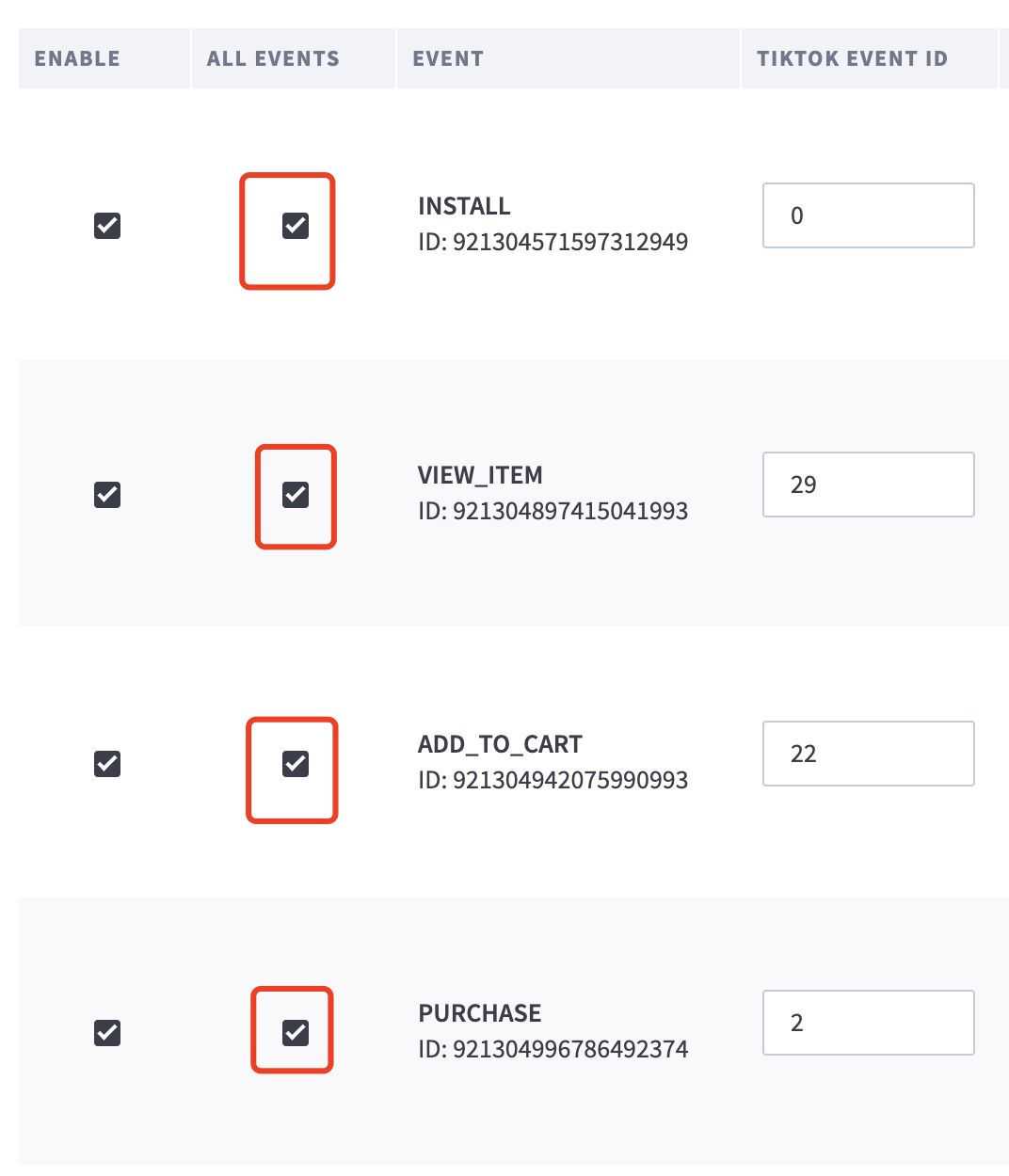
4. 将 Branch 账户的完全读取权限授予 TikTok 团队成员,或将上述所有设置的屏幕截图发送给你的销售代表。
5. 示例原始数据
$sku 是兼容的。我们的后端系统会将其解析为 content_id。
ViewContent:29
JSON
1.{ 2. "eventEnum": "29", 3. "properties": [ 4. { 5. "$publicly_indexable": false, 6. "$locally_indexable": false, 7. "$exp_date": 0, 8. "$canonical_identifier": "", 9. "$og_title": "xxxxxster: (null)", 10. "$canonical_URL": "", 11. "$og_description": "", 12. "$og_image_URL": "https://xxxxxx.com/xxxxxmonsterfactory/200.png", 13. "$price": 0, 14. "$quantity": 0, 15. "$sku": "123456", 16. "$product_name": "", 17. "$product_brand": "", 18. "$product_variant": "", 19. "$rating": 0, 20. "$rating_average": 0, 21. "$rating_count": 0, 22. "$rating_max": 0, 23. "$address_street": "", 24. "$address_city": "", 25. "$address_region": "", 26. "$address_country": "", 27. "$address_postal_code": "", 28. "$latitude": 0, 29. "$longitude": 0, 30. "$creation_timestamp": 0, 31. "face_index": "0", 32. "android_tracker_id": "abcdpp", 33. "~id": "76xxxxxxxxxxxxxxx5", 34. "~referring_link": "https://xxxxxster.app.link/BQHXB0fO04", 35. "~channel": "WhatsApp", 36. "$ios_passive_deepview": "[xxxxx]_xxxxx_monster_factory_(xxxxxster.app.link)_deepview_lo0d", 37. "$identity_id": "76xxxxxxxxxxxxxxx5", 38. "body_index": "0", 39. "ios_tracker_id": "abcd", 40. "monster_name": "Bugsitos", 41. "color_index": "4", 42. "monster": "true" 43. } 44. ], 45. "context": { 46. "ad": { 47. "callback": "", 48. "attributed": "false", 49. "attributionType": "click_through", 50. "isRetargeting": "false" 51. }, 52. "app": { 53. "id": "id917737838", 54. "name": "[xxxxx] xxxxx Monster Factory (xxxxxster.app.link)", 55. "version": "1.3.1" 56. }, 57. "device": { 58. "platform": "iOS", 59. "idfa": "302FBE13-xxxx-xxxx-xxxx-6CF1C2E1BC3A", 60. "idfv": "1A032C31-xxxx-xxxx-xxxx-C5681B9A43E6", 61. "gaid": "", 62. "imei": "", 63. "android_id": "" 64. }, 65. "locale": "en-US", 66. "location": { 67. "city": "SH", 68. "country": "CO", 69. "latitude": "4.6493", 70. "longitude": "-74.061699" 71. }, 72. "ip": "186.29.215.109", 73. "userAgent": "Mozilla/5.0 (iPhone; CPU iPhone OS 13_3_1 like Mac OS X) AppleWebKit/605.1.15 (KHTML, like Gecko) Mobile/15E148" 74. }, 75. "timestamp": "2020-03-20T15:36:00.000Z" 76.}
AddToCart:22
JSON
1.{ 2. "eventEnum": "22", 3. "properties": [ 4. { 5. "$publicly_indexable": true, 6. "$locally_indexable": true, 7. "$exp_date": 0, 8. "$canonical_identifier": "", 9. "$og_title": "product", 10. "$canonical_URL": "", 11. "$og_description": "", 12. "$og_image_URL": "", 13. "$price": 349, 14. "$quantity": 0, 15. "$sku": "37605", 16. "$product_name": "", 17. "$product_brand": "37605", 18. "$product_variant": "", 19. "$rating": 0, 20. "$rating_average": 0, 21. "$rating_count": 0, 22. "$rating_max": 0, 23. "$address_street": "", 24. "$address_city": "", 25. "$address_region": "", 26. "$address_country": "", 27. "$address_postal_code": "", 28. "$latitude": 0, 29. "$longitude": 0, 30. "$creation_timestamp": -550772308, 31. "$currency": "INR" 32. } 33. ], 34. "context": { 35. "ad": { 36. "callback": "__callback_param__", 37. "attributed": "true", 38. "attributionType": "click_through", 39. "isRetargeting": "false" 40. }, 41. "app": { 42. "id": "XXXXXX.XX.customer", 43. "name": "XXXXXX", 44. "version": "1.59" 45. }, 46. "device": { 47. "platform": "Android", 48. "idfa": "", 49. "idfv": "", 50. "gaid": "dd66c169-xxxx-xxxx-xxxx-227e891ec61a", 51. "imei": "", 52. "android_id": "" 53. }, 54. "locale": "en-US", 55. "location": { 56. "city": "BJ", 57. "country": "IN", 58. "latitude": "28.4597", 59. "longitude": "77.028198" 60. }, 61. "ip": "11.111.111.1", 62. "userAgent": "Mozilla/5.0 (Linux; Android 10; SM-G970F Build/QP1A.190711.020; wv) AppleWebKit/537.36 (KHTML, like Gecko) Version/4.0 Chrome/80.0.3987.132 Mobile Safari/537.36" 63. }, 64. "timestamp": "2020-03-15T17:09:20.000Z" 65.}
Purchase:2
JSON
1.{ 2. "eventEnum": "2", 3. "properties": [ 4. { 5. "$publicly_indexable": false, 6. "$locally_indexable": false, 7. "$exp_date": 0, 8. "$canonical_identifier": "", 9. "$og_title": "", 10. "$canonical_URL": "", 11. "$og_description": "", 12. "$og_image_URL": "", 13. "$price": 1294, 14. "$quantity": 1, 15. "$sku": "44282", 16. "$product_name": "", 17. "$product_brand": "", 18. "$product_variant": "", 19. "$rating": 0, 20. "$rating_average": 0, 21. "$rating_count": 0, 22. "$rating_max": 0, 23. "$address_street": "", 24. "$address_city": "", 25. "$address_region": "", 26. "$address_country": "", 27. "$address_postal_code": "", 28. "$latitude": 0, 29. "$longitude": 0, 30. "$creation_timestamp": 0 31. } 32. ], 33. "context": { 34. "ad": { 35. "callback": "", 36. "attributed": "false", 37. "attributionType": "click_through", 38. "isRetargeting": "false" 39. }, 40. "app": { 41. "id": "XXXXXX.tv.customer", 42. "name": "XXXXXX", 43. "version": "" 44. }, 45. "device": { 46. "platform": "Android", 47. "idfa": "", 48. "idfv": "", 49. "gaid": "", 50. "imei": "", 51. "android_id": "" 52. }, 53. "locale": "en-US", 54. "location": { 55. "city": "SZ", 56. "country": "IN", 57. "latitude": "28.6504", 58. "longitude": "77.237198" 59. }, 60. "ip": "1.1.1.1", 61. "userAgent": "Mozilla/5.0 (Linux; Android 8.1.0; ASUS_X00LD Build/OPM1.171019.011; wv) AppleWebKit/537.36 (KHTML, like Gecko) Version/4.0 Chrome/80.0.3987.132 Mobile Safari/537.36 [FB_IAB/FB4A;FBAV/261.0.0.52.126;]" 62. }, 63. "timestamp": "2020-03-15T09:24:53.000Z" 64.}
Singular
1. 确认已添加 Purchase(购买)、AddToCart(加入购物车)、ViewContent(查看内容)事件并已将这些事件传递到 TikTok 广告管理平台。
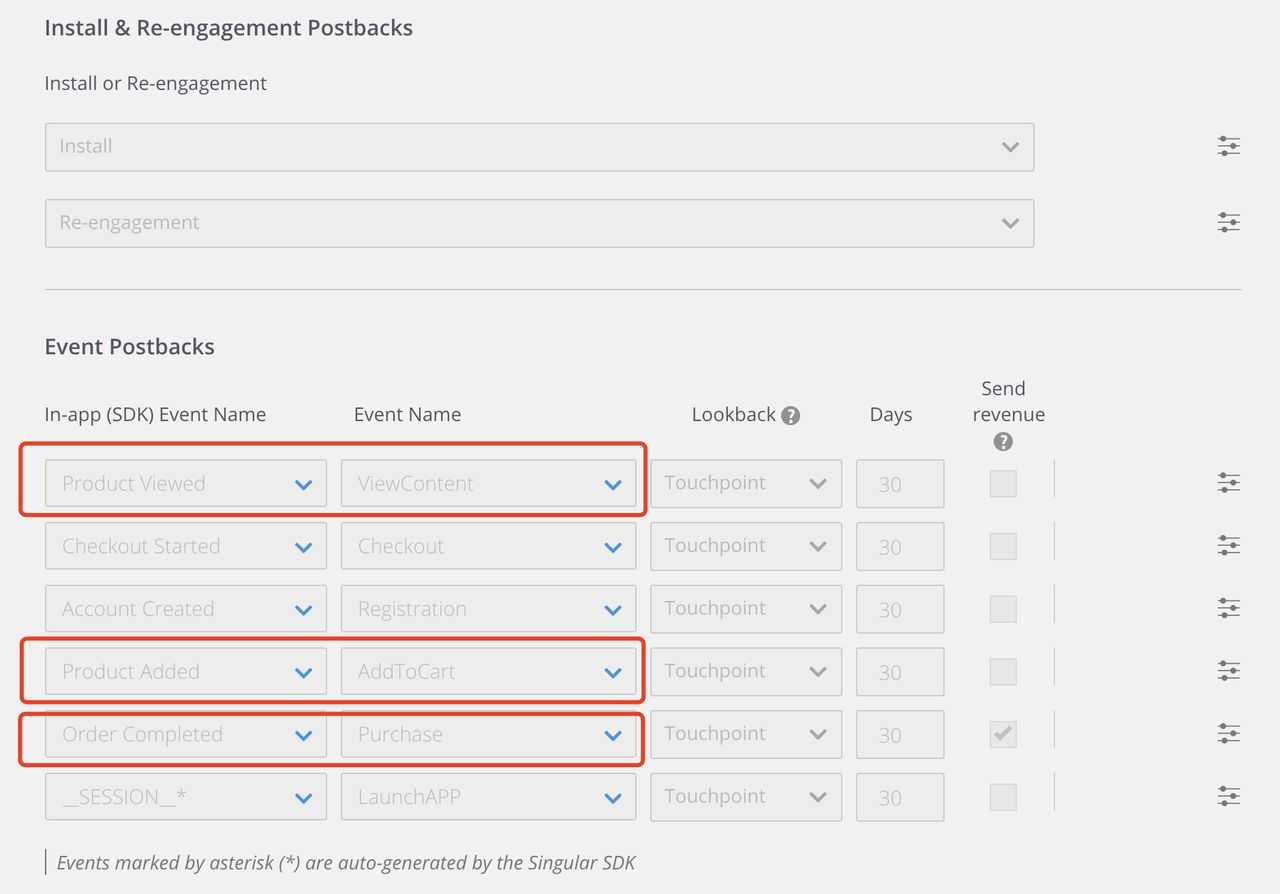
2. 确认 content_id(内容 ID)将在事件属性中传递至 TikTok 广告管理平台。你可以使用回传模板对属性进行自定义、将特定字段映射到 content_id 并发送到 TikTok 广告管理平台。
3. 在“事件回传”下,确保所有事件数据都将发送到 TikTok 广告管理平台。
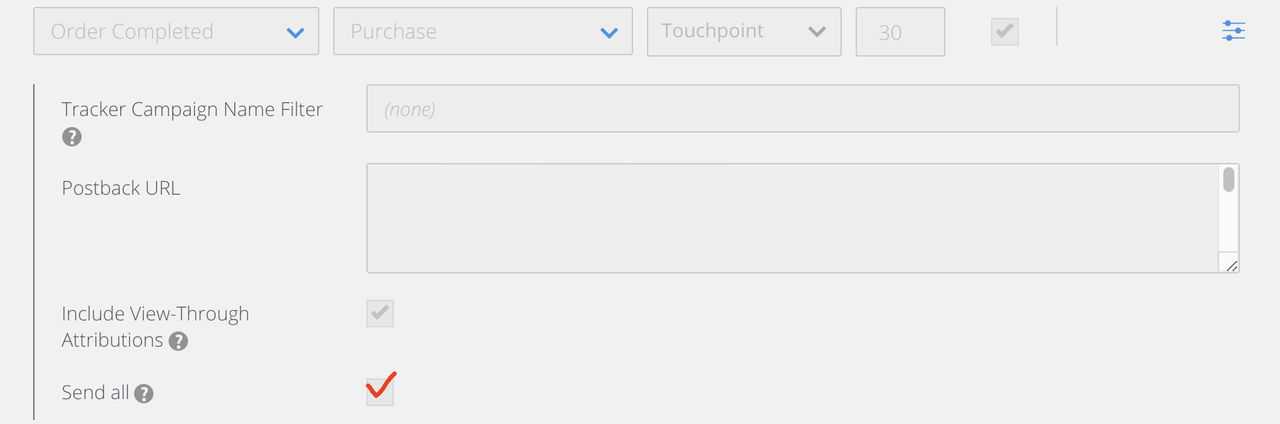
4.广告主可以将其 Singular 账户的读取权限授予 TikTok 团队成员,或将上述所有设置的屏幕截图发送给你的销售代表。
5. 示例原始数据
ViewContent:29
JSON
1.{ 2. "context": { 3. "ad": { 4. "attributed": "0", 5. "callback": "", 6. "isRetargeting": "1" 7. }, 8. "app": { 9. "id": "com.xxx.main", 10. "name": "XXX", 11. "namespace": "com.xxx.main", 12. "version": "7.0.2" 13. }, 14. "device": { 15. "android_id": "", 16. "gaid": "xxxxx-xxxx-xxxx-xxxx-xxxxxxxx", 17. "idfa": "", 18. "idfv": "", 19. "platform": "Android" 20. }, 21. "ip": "157.34.136.238", 22. "location": { 23. "city": "--", 24. "country": "IN", 25. "state": "--" 26. } 27. }, 28. "event": "ViewContent", 29. "properties": { 30. "content_id": "658424741287", 31. "content_type": "lifestyle-watches", 32. "currency": "INR", 33. "quantity": "1", 34. "value": "369" 35. }, 36. "timestamp": "2020-03-15T09:00:18" 37.}
AddToCart:22
JSON
1.{ 2. "context": { 3. "ad": { 4. "attributed": "0", 5. "callback": "", 6. "isRetargeting": "1" 7. }, 8. "app": { 9. "id": "com.snapdeal.main", 10. "name": "Snapdeal", 11. "namespace": "com.snapdeal.main", 12. "version": "6.5.8" 13. }, 14. "device": { 15. "android_id": "", 16. "gaid": "1d9d0928-355b-4c36-848e-f91610816242", 17. "idfa": "", 18. "idfv": "", 19. "platform": "Android" 20. }, 21. "ip": "47.9.212.233", 22. "location": { 23. "city": "Ranchi", 24. "country": "IN", 25. "state": "Jharkhand" 26. } 27. }, 28. "event": "AddToCart", 29. "properties": { 30. "content_id": "644210250756", 31. "content_type": "women-ethnicwear", 32. "currency": "INR", 33. "quantity": "1", 34. "value": "688.0" 35. }, 36. "timestamp": "2020-03-15T09:00:03" 37.}
Purchase:2
JSON
1.{ 2. "context": { 3. "ad": { 4. "attributed": "0", 5. "callback": "", 6. "isRetargeting": "1" 7. }, 8. "app": { 9. "id": "com.yyyyy.main", 10. "name": "yyyyy", 11. "namespace": "com.yyyyy.main", 12. "version": "7.0.2" 13. }, 14. "device": { 15. "android_id": "", 16. "gaid": "yyyyyy-yyyy-yyyy-yyyy-yyyyyyyy", 17. "idfa": "", 18. "idfv": "", 19. "platform": "Android" 20. }, 21. "ip": "27.56.86.47", 22. "location": { 23. "city": "Guwahati", 24. "country": "IN", 25. "state": "Assam" 26. } 27. }, 28. "event": "Purchase", 29. "properties": { 30. "content_id": "623319175468", 31. "content_type": "", 32. "currency": "INR", 33. "quantity": "1", 34. "value": "370" 35. }, 36. "timestamp": "2020-03-15T09:00:26" 37.}
Adjust
1. 确认已添加 Purchase(购买)、Add to Cart(加入购物车)、View content(查看内容)事件并已将这些事件传递到 TikTok 广告管理平台。
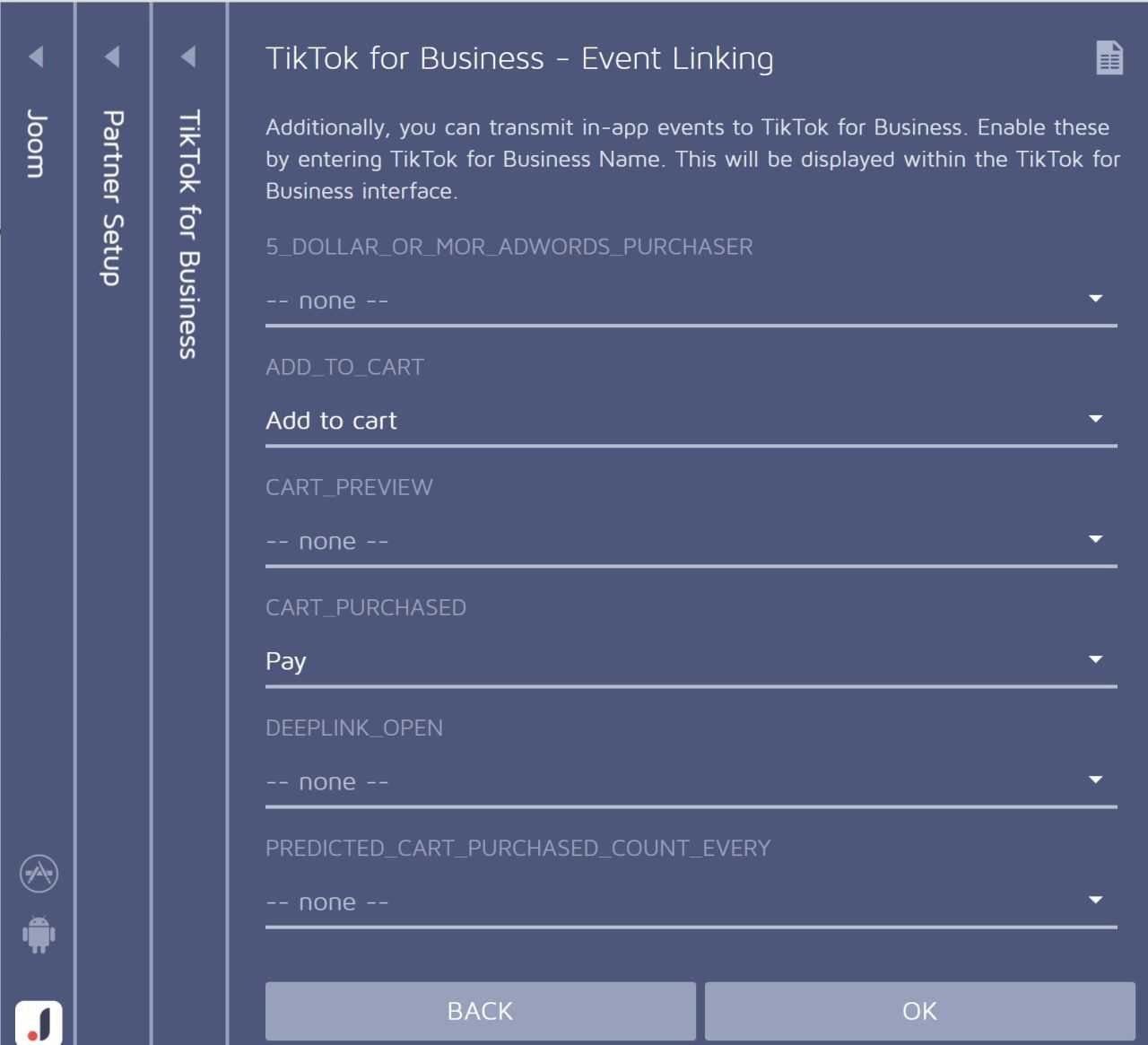
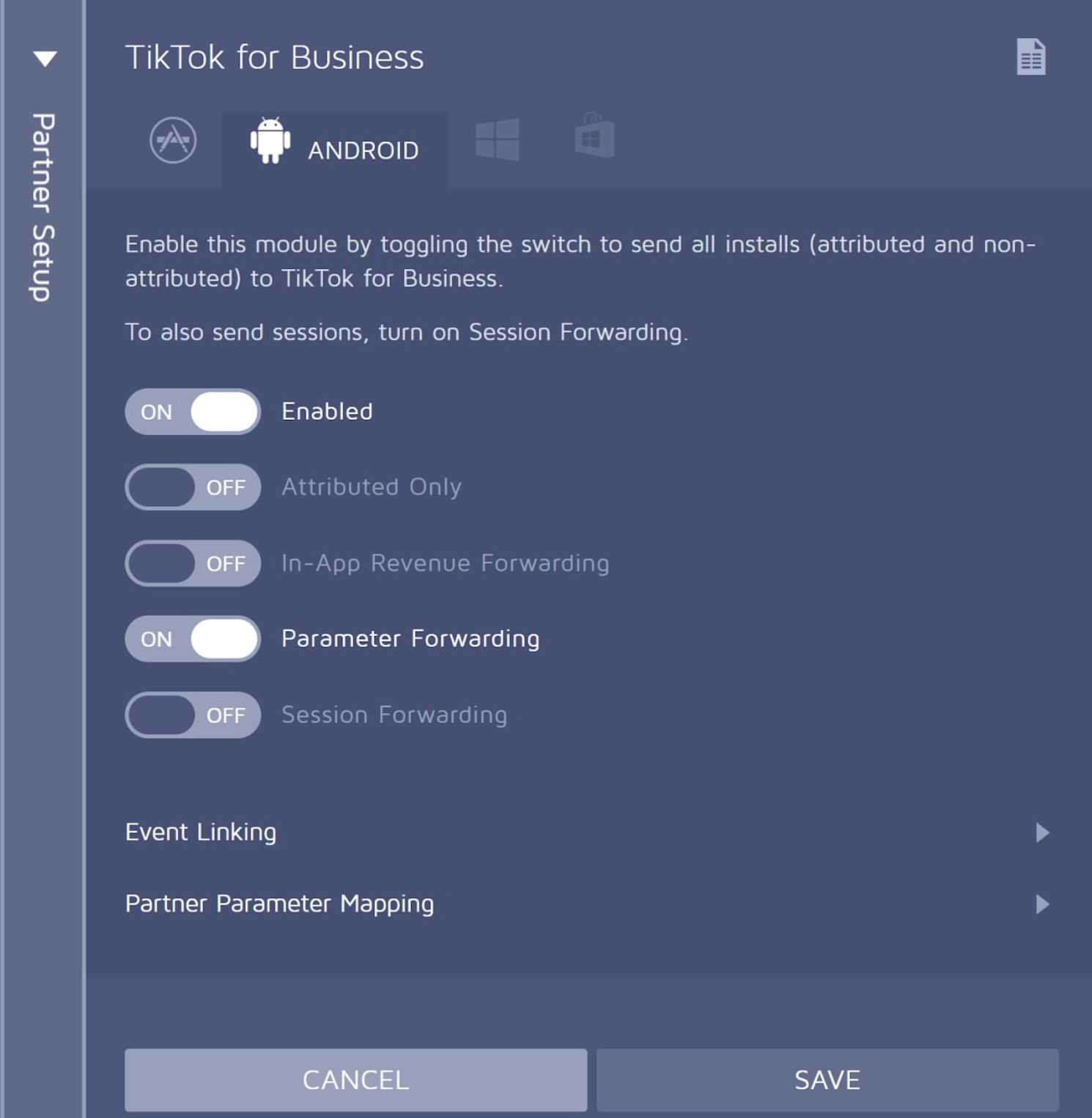
2. 确认 content_id(内容 ID)将在事件属性中传递至 TikTok 广告管理平台。如果与 Adjust SDK 集成时未定义 content_id,你可以手动映射。
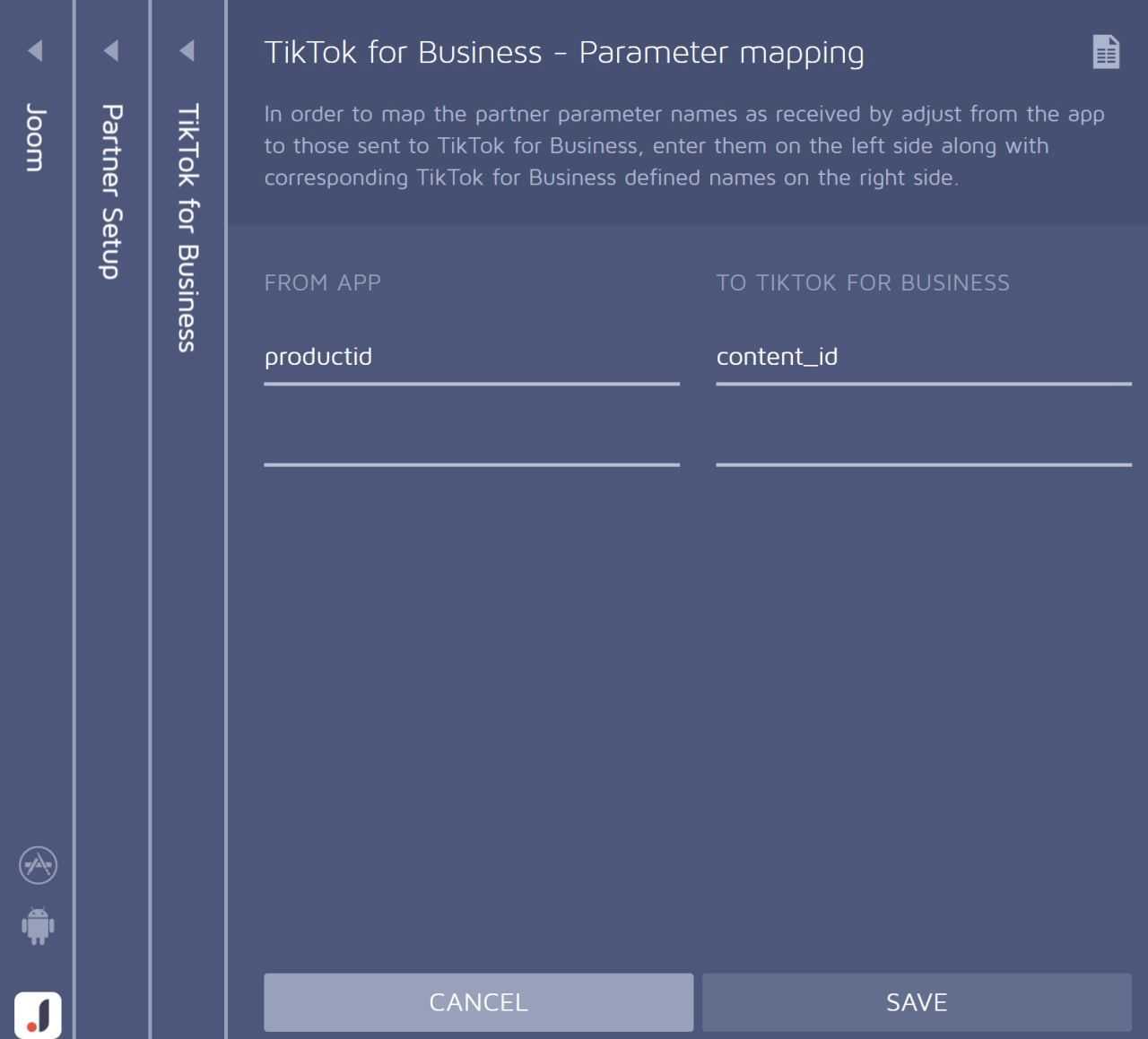
3. 确认已打开“启用”和“参数转发”,并且已关闭“仅限归因”。
4. 将你的 Adjust 账户的读取权限授予 TikTok 团队成员,或将上述所有设置的屏幕截图发送给你的销售代表。
5. 示例原始数据
ViewContent:29
JSON
1.{ 2. "genreid": "100017", 3. "skus": "e-8783:10005115", 4. "fb_content_type": "product", 5. "content_id": "e-8783:10005115", 6. "contents": [ 7. { 8. "content_id": "e-8783:10005115" 9. } 10. ], 11. "external_id": "9ac6946d-24fd-4fac-a3be-69f05798e146", 12. "shopid": "225192", 13. "criteo_p": "e-8783:10005115", 14. "fb_content_id": [ 15. "e-8783:10005115" 16. ], 17. "shopurl": "e-8783" 18.}
AddToCart:22
JSON
1.{ 2. "skus": "m-trust:10038196", 3. "fb_content_type": "product", 4. "itemid_as_notencoded": "m-trust:10038196", 5. "content_id": "m-trust:10038196", 6. "itemid_as": "%5B%22m-trust%3A10038196%22%5D", 7. "external_id": "16739875-f493-456e-a09a-0b0dce7786c9", 8. "fb_content": [ 9. { 10. "quantity": "1", 11. "item_price": "1080", 12. "id": "m-trust:10038196" 13. } 14. ], 15. "product_action": "AddToCart", 16. "criteo_p": "%5B%7B%22i%22%3A%22m-trust%3A10038196%22%2C%22pr%22%3A%221080%22%2C%22q%22%3A%221%22%7D%5D", 17. "shopurl": "m-trust", 18. "genreid_as": "%5B%22563742%22%5D", 19. "genreid_as_notencoded": "563742", 20. "contents": [ 21. { 22. "content_id": "m-trust:10038196" 23. } 24. ], 25. "shopid": "245969" 26.}
Purchase:2
JSON
1.{ 2. "transaction_id": "210384-20210204-00067739", 3. "fb_content_type": "product", 4. "itemid_as_notencoded": "nejiya:10453171", 5. "content_id": "nejiya:10453171", 6. "itemid_as": "%5B%22nejiya%3A10453171%22%5D", 7. "external_id": "4f43835d-fdac-4b57-9864-5f9a6df5f692", 8. "criteo_p": "%5B%7B%22i%22%3A%22nejiya%3A10453171%22%2C%22pr%22%3A%22312%22%2C%22q%22%3A%221%22%7D%5D", 9. "shopurl": "nejiya", 10. "genreid_as": "%5B%22565409%22%5D", 11. "_valuetosum": "312", 12. "genreid_as_notencoded": "565409", 13. "contents": [ 14. { 15. "quantity": "1", 16. "content_id": "nejiya:10453171", 17. "price": "312" 18. } 19. ], 20. "total_amount": "312", 21. "fb_currency": "JPY", 22. "currency": "JPY", 23. "shopid": "210384", 24. "items": "s%3Dnejiya%3A10453171%26q%3D1%26v%3D312", 25. "value": "312" 26.}
AppsFlyer
1. 确认已将 Pay(支付)、Add_to_cart(加入购物车)、View_content(查看内容)事件添加到“监测”下。
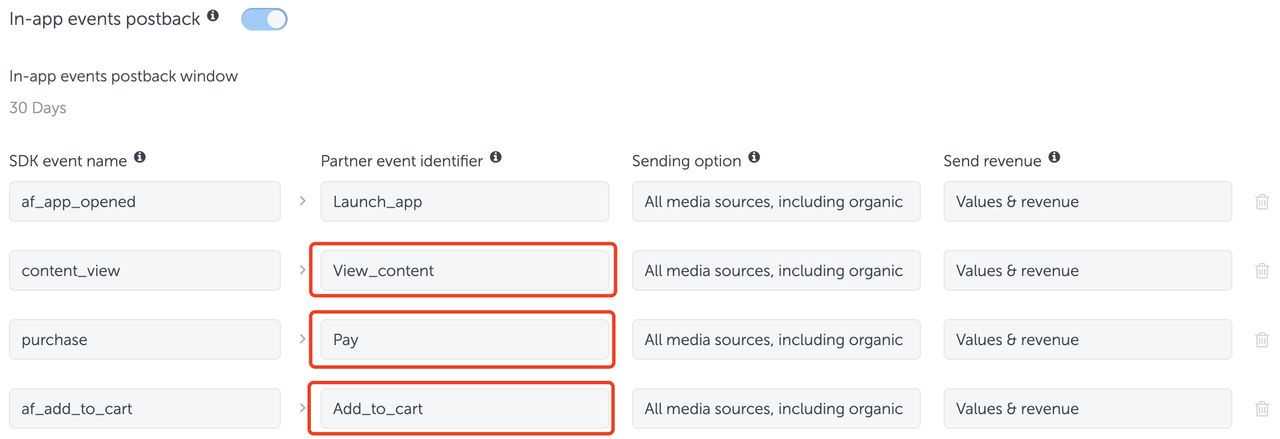
2. 确保 af_content_id 将在事件属性中传递至 TikTok 广告管理平台,此字段将映射到 TikTok 上的 content_id——对于需要发送 af_content_id 字段的事件,必须选中“发送收入”。
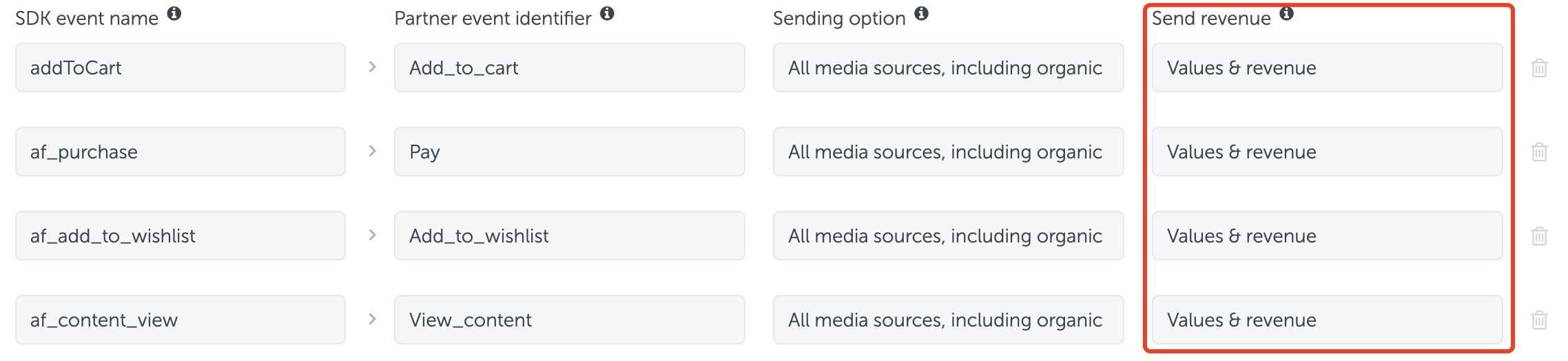
3. 确保所有事件都会发送到 TikTok 广告管理平台。
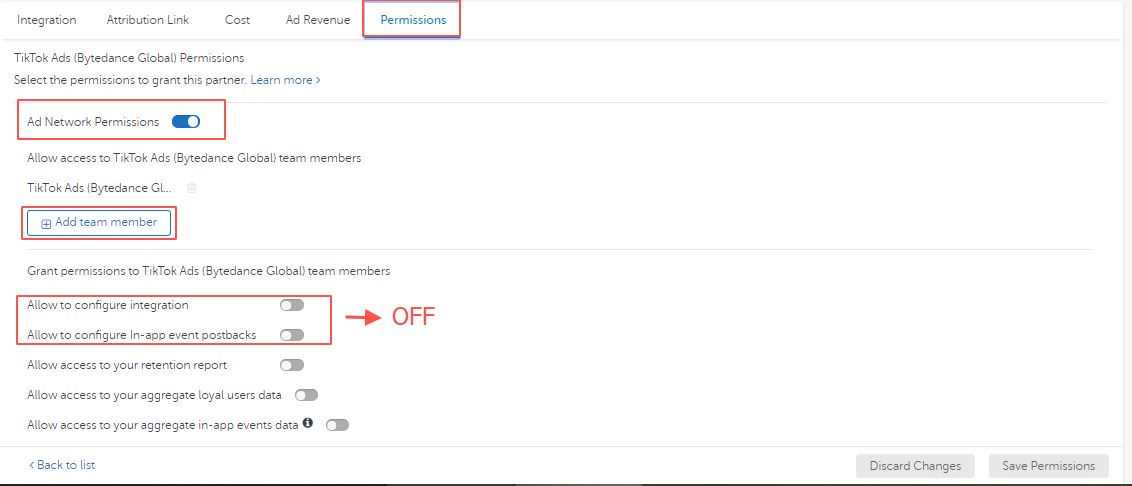
4. 向 TikTok 团队成员授予读取权限。打开广告网络权限,添加相关的 TikTok 团队成员,关闭允许配置集成和允许配置应用内事件回传。
5. 示例原始数据
属性中的 af_content_id 将由 TikTok 广告管理平台的后端系统解析为 content_id。
ViewContent:29
JSON
1.{ 2. "eventEnum": "29", 3. "properties": { 4. "af_content_id": "************8b998", 5. "minutes_consumed": 24691, 6. "uuid": "xxxxx-xxxx-xxxx-xxxx-xxxxxxxx", 7. "af_content_type": "movie_film", 8. "media_duration": 6471000, 9. "af_content": "Attraction xxxx xxxxx" 10. }, 11. "context": { 12. "ad": { 13. "callback": "", 14. "attributed": "false", 15. "attributionType": "", 16. "isRetargeting": "", 17. "retargetingType": "", 18. "af_is_primary": "true" 19. }, 20. "app": { 21. "id": "com.xxxx.xxxx.xx" 22. }, 23. "device": { 24. "platform": "android", 25. "idfa": "", 26. "idfv": "", 27. "imei": "", 28. "gaid": "************", 29. "android_id": "xxxxxxxxxxxx" 30. }, 31. "locale": "en", 32. "location": { 33. "city": "Miraj", 34. "country": "IN" 35. }, 36. "ip": "************.23", 37. "userAgent": "Dalvik/2.1.0 (Linux; U; Android 7.0; IF9031 Build/NRD90M)" 38. }, 39. "timestamp": "2020-03-24T17%3A21%3A18.444Z" 40.}
AddToCart:22
JSON
1.{ 2. "eventEnum": "22", 3. "properties": { 4. "af_content": "XYZ", 5. "af_content_gender": "Women", 6. "af_revenue": 758, 7. "af_price": 758, 8. "af_content_id": "10841122", 9. "af_product_info": "XYZ Women Dress" 10. }, 11. "context": { 12. "ad": { 13. "callback": "", 14. "attributed": "false", 15. "attributionType": "", 16. "isRetargeting": "", 17. "retargetingType": "", 18. "af_is_primary": "false" 19. }, 20. "app": { 21. "id": "com.myntra.android" 22. }, 23. "device": { 24. "platform": "android", 25. "idfa": "", 26. "idfv": "", 27. "imei": "", 28. "gaid": "zzzzz-zzzz-zzzz-zzzz-zzzzzzzz", 29. "android_id": "" 30. }, 31. "locale": "en", 32. "location": { 33. "city": "Madurai", 34. "country": "IN" 35. }, 36. "ip": "192.168.0.1", 37. "userAgent": "Dalvik/2.1.0 (Linux; U; Android 9; Redmi Note 6 Pro MIUI/V11.0.2.0.PEKMIXM)" 38. }, 39. "timestamp": "2020-03-15T09:00:37.029Z" 40.}
Purchase:2
JSON
1.{ 2. "eventEnum": "2", 3. "properties": "{ 4. "af_content_id": "********094", 5. "af_currency": "USD", 6. "af_price": 2.84, 7. "af_quantity": 1 8. }", 9. "context": { 10. "ad": { 11. "callback": "111111-1111111111-111111111", 12. "attributed": "false", 13. "attributionType": "", 14. "isRetargeting": "", 15. "retargetingType": "", 16. "af_is_primary": "true" 17. }, 18. "app": { 19. "id": "xxxxxxxx" 20. }, 21. "device": { 22. "platform": "ios", 23. "idfa": "************", 24. "idfv": "", 25. "imei": "", 26. "gaid": "", 27. "android_id": "" 28. }, 29. "locale": "ru_RU", 30. "location": { 31. "city": "xxxxxx", 32. "country": "aa" 33. }, 34. "ip": "************.114", 35. "userAgent": "Mozilla/5.0 (iPhone; CPU iPhone OS 12_4_1 like Mac OS X) AppleWebKit/602.3.12 (KHTML, like Gecko) Mobile/14C92" 36. }, 37. "timestamp": "2020-03-24T17%3A21%3A08.029Z" 38.}