





首页跨境头条文章详情

TikTok直播各界面功能分别是什么?

6104
2025-06-20 10:30
2025-06-20 10:30
6104

TikTok广告免费开户,超高返点,还有赠金哦!点击咨询详情>>>

如何开播/How to go LIVE

获取开播权限/ Get access to go LIVE

美国和英国地区的用户,当TikTok账号达到1k粉丝,则可自动获取的开播权限/ For users from US and UK, the access to go LIVE will be automatically granted after the TikTok account gets more than 1k followers.

TikTok手机端开播/ Go Live on TikTok via smartphone 

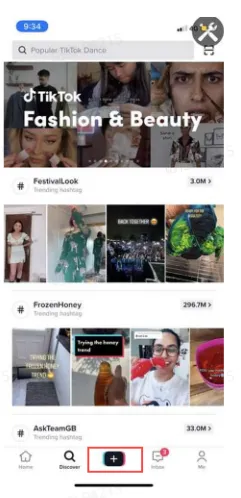
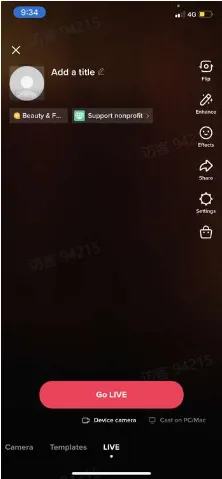
  • 点击下方中间的“+”进入直播界面,设置直播封面、标题,添加直播话题,点击"Go LIVE"开启手机端直播。

  • Tap the icon "+" at the bottom of the screen. Pick an image, write a title, add hashtags and tap "Go LIVE" to start your stream.
TikTok直播各界面分别是什么?TikTok直播各界面分别是什么?

TikTok OBS开播/ Go LIVE via OBS

OBS开播需要商家联系您的客户经理开通OBS推流权限/ streamers need to contact their account managers to get access to go LIVE via OBS

OBS推流步骤/ Procedures of Starting Streaming

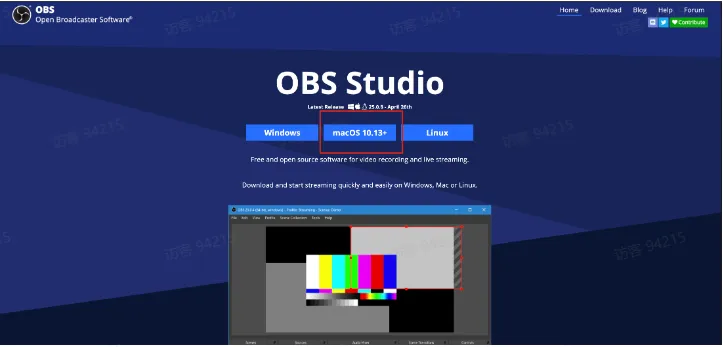
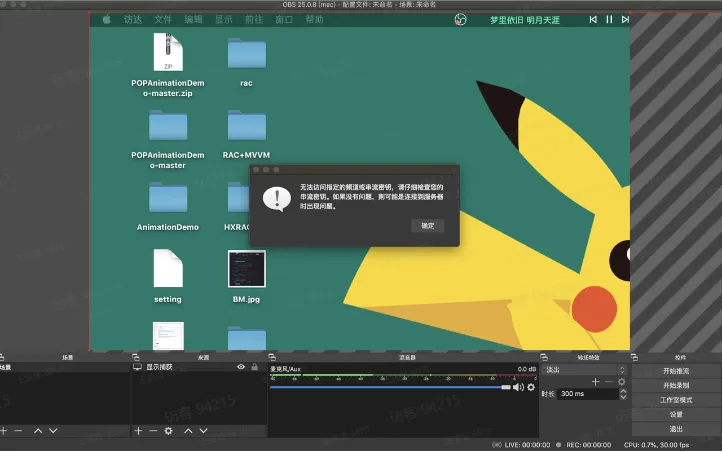
Step1: 下载并安装推流神器 OBS/ Download and install OBS: https://obsproject.com/

TikTok直播各界面分别是什么?

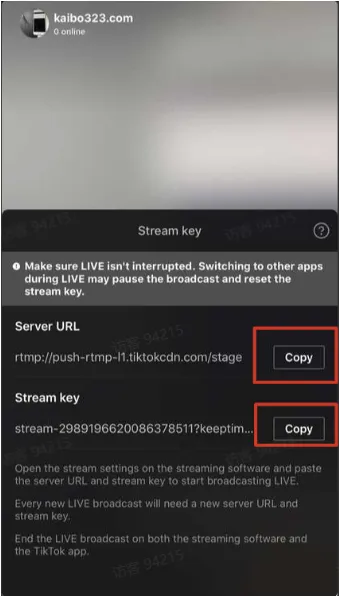
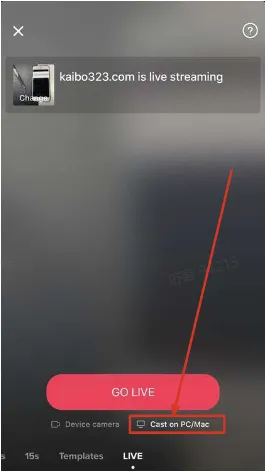
Step 2 : 开播选择"cast on PC/Mac”

Tap "Cast on PC/Mac" before GO LIVE

TikTok直播各界面分别是什么?

复制服务器URL和直播密钥/ Copy the server URL and the stream key

TikTok直播各界面分别是什么?TikTok直播各界面分别是什么?

Step 3 : 设置神器推流地址/ Click "Settings" to set the stream RTMP link

TikTok直播各界面分别是什么?

服务选择自定义/ Service: Choose "Custom"

填写刚才复制的 Server URL & Stream key/ Paste copied Server URL and Stream key

TikTok直播各界面分别是什么?

Step 4: 选择推流资源/ Choose sources

可以选择本地视频、图片、屏幕等等/ Can choose from Media Source, Image, Window Capture, etc.

TikTok直播各界面分别是什么?

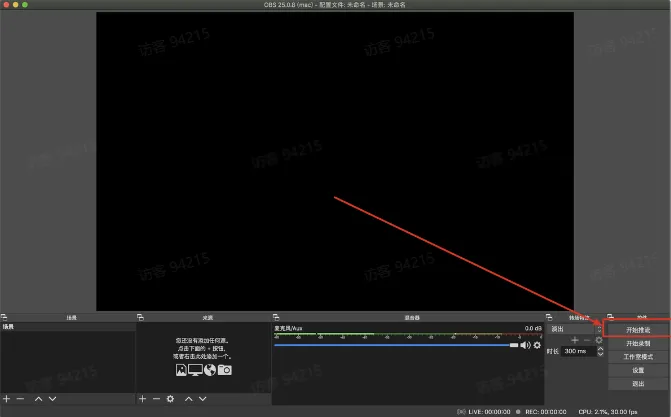
Step 5 : 开始推流/ Start streaming

TikTok直播各界面分别是什么?

可能遇到问题/ Problems you may encounter

1 未能解析密钥/ Invalid stream key

解决方式 : 重试/ Solution: try again

TikTok直播各界面分别是什么?


主播端界面&功能说明 / UI and Functions of Streamers


开播前和开播中的相关设置 / Settings before LIVE and during LIVE

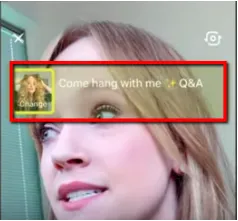
  • 直播封面和直播标题 /Cover and Titile of LIVE

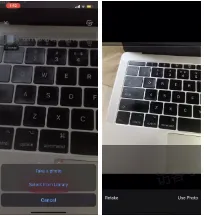
  1. 开播前主播可通过"take a photo" (拍照)或者"select from library" (从相册中选择) 设置直播封面

  2. 设置好直播封面后,主播可输入直播标题(最长32个字符)

  • Cover and Title of LIVE:

  1. Before LIVE, streamers can set the cover by tapping "take a photo" or "selecet from library"

  2. Then, streamers can write a title (the maximum is 32 characters)

直播标题封面Tips

  • 设置流行或者关键词Hashtag

  • 标题和封面和直播内容相关: 如果您的直播卖美妆但是标题却是3C产品。这种不相关的、具有欺骗性的标题,会引起用户的反感,不利于提升直播间人气。

  • 可以使用表情符号、标点符号 (感叹号等)

  • 突出直播特征,比如名人、美妆博主等 

  • 建立群体标签,用一些关键词与特定的群体联系起来,比如男装专场等

  • 巧用营销词汇: 专场、盛宴、福利、折扣、豪礼、狂欢、限量、限时、超强\值\低\划算


Tips

  • Add trendy hashtags or hashtags of your keywords

  • Titles and covers should be relevant to your LIVE: if you promote beauty products on your LIVE but the title is about 3C products, this may be unpleasant for viewers and undermine your LIVE.

  • Use emojis or punctuation marks (like exclamation mark)

  • Highlight your features such as influencers, beauty blogger and so forth

  • Categorize your LIVE by using some keywords to be associated with certain groups, like Men's Fashion

  • Marketing words: special event, carnival, bonus, discount, gift, festival, limited sales, limited time, highest, lowest, cost-effective

设置直播封面/ Set the cover

设置直播标题/ Write a title

TikTok直播各界面分别是什么?TikTok直播各界面分别是什么?


TikTok直播各界面分别是什么?TikTok直播各界面分别是什么?

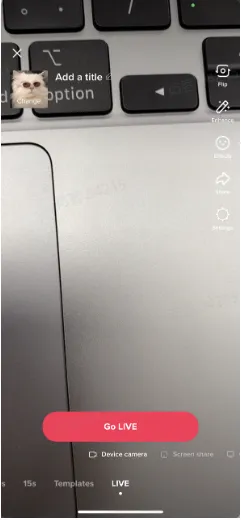
  • 镜头翻转:主播可点击屏幕右侧"Flip"选择翻转前后摄像头。

  • Flip the camera: streamers can flip between front and back camera by tapping "Flip"

TikTok直播各界面分别是什么?

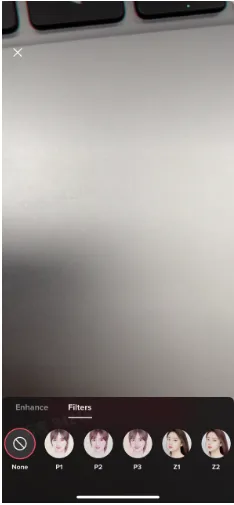
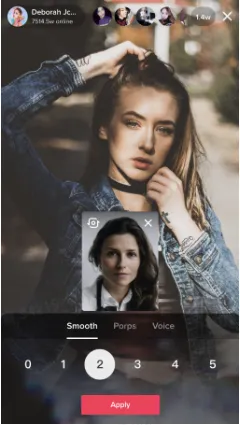
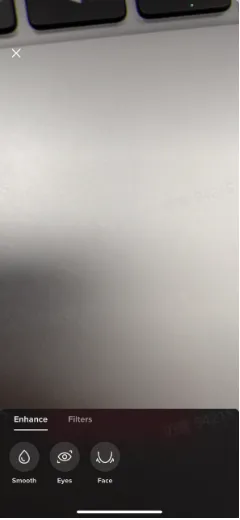
  • 视频美颜:主播可选择美颜和滤镜特效。

  • Enhance videos: streamers can enhance the video and add filters

美颜(磨皮/大眼/瘦脸)Enhance (Smooth/Eyes/Face)

滤镜/ Filters

TikTok直播各界面分别是什么?

TikTok直播各界面分别是什么?

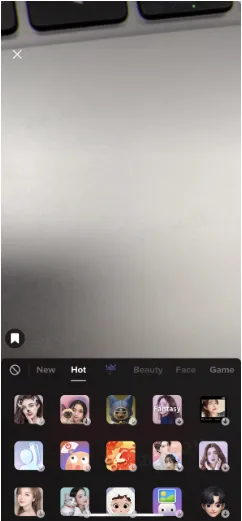
  • 视频特效:主播可点击"Effects"选择不同的视频特效。

  • Add effects: streamers can choose from different effects by tapping "Effects"

视频特效 Add effects

选择不同的视频特效 Various effects

TikTok直播各界面分别是什么?

TikTok直播各界面分别是什么?

  • 直播间分享:主播可点击"Share"分享直播间至TikTok好友或个人其他社媒主页,如:WhatsApp, Facebook等。

  • Share your LIVE: streamers can tap "Share" to get a link of your LIVE room which can be sent to your TikTok friends or posted on other social media platforms such as WhatsApp, Facebook and so on.

TikTok直播各界面分别是什么?

  • 设置:主播可设置直播间礼物、开启直播间留言及直播间屏蔽关键词,屏蔽词最多可设置200个英文单词;

  • Settings: streamers can tap "Settings" to allow gifts and comments and add any comment filters. The maximum number of comment filters is 200.


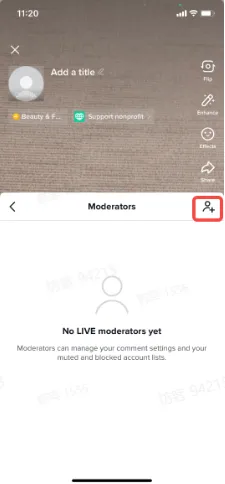
  • Moderator场控管理员:主播可以通过设置互粉的好友和观众作为管理员来禁言和拉黑,最多支持设置20个moderators(数值可配置)

  • Moderators: streamers can assign certain mutual followers or viewers to be moderators for managing comments (mute or block)

    • 开播前,点击Settings->Moderators,可指定互粉的好友帮助主播禁言和拉黑;

    • 直播中,点击用户头像,点击右上角的manage,则可以设置直播间的用户为moderator,帮助主播禁言与拉黑;

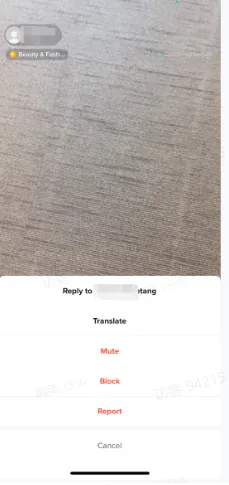
    • 直播中,针对发表不当言论的用户长按用户头像,点击Mute禁言,则该用户无法再发送评论,点击Block,则该用户无法再进入直播间;

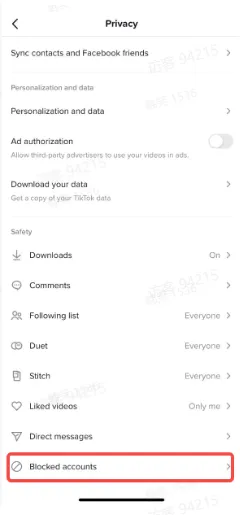
    • Moderators可以针对某个用户进行拉黑/禁言,每次的拉黑/禁言是整体操作,如果需要解禁或者不影响该观众再次进入到主播的直播间,需要去privacy的设置中再次把这位观众释放出来

    • Before LIVE, by tapping on Settings-->Moderators, streamers can assign mutual followers as moderator to help mute or block.

    • During LIVE, by tapping on the viewer's head photo and then clicking on 'Manage' at the upright corner, streamers can assign such viewer as moderator to help mute or block.

    • During LIVE, press and hold users' profile photo and a pop-up will come up. Tap "Mute" to ban users from commenting and tap "Block" to ban users from entering your LIVE.

    • Muting and blocking certain audiences is a one-time operation. The audience will be no longer able to enter the livestreaming unless streamers remove such audience from the privay settings.

TikTok直播各界面分别是什么?TikTok直播各界面分别是什么?TikTok直播各界面分别是什么?

TikTok直播各界面分别是什么?

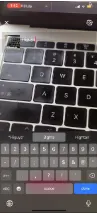
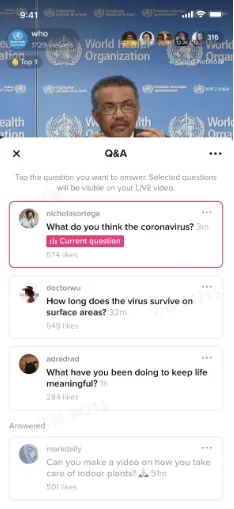
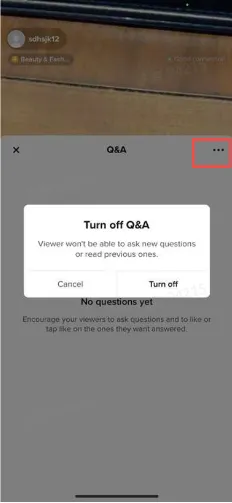
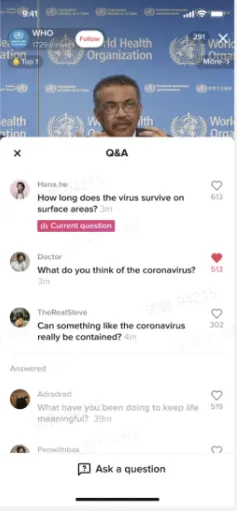
  • 直播中回答用户的Q&A:点击下方问号图标,可以查看并回答用户的问题,也可点击右上方的三个点点关闭Q&A。

  • Q&A during LIVE: tap the icon with question mark at the bottom to view and answer questions from buyers. Tap the three dots at the upright corner to turn off Q&A.

TikTok直播各界面分别是什么?TikTok直播各界面分别是什么?TikTok直播各界面分别是什么?


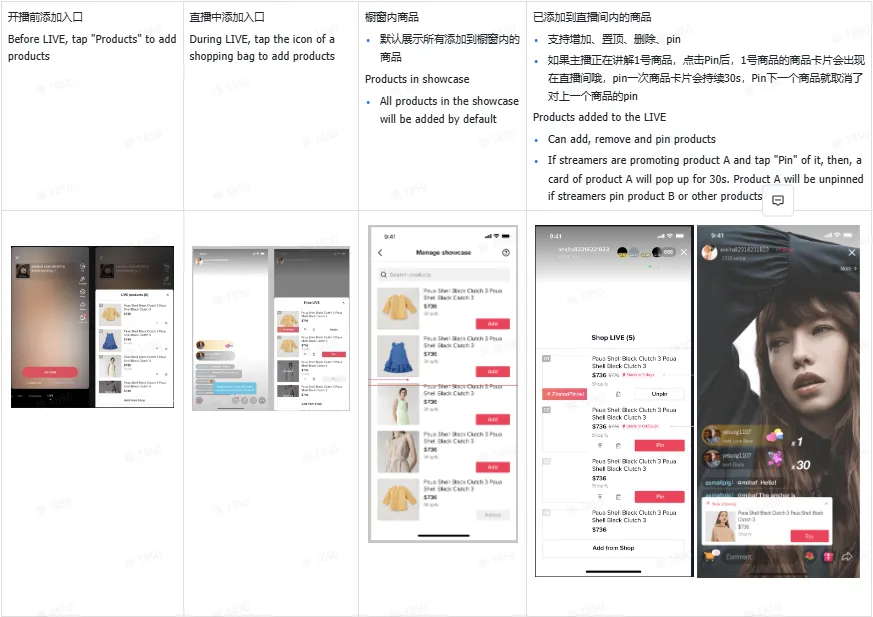
  • 添加商品功能:支持主播开播前+直播中从TikTok Shop店铺中添加商品

  • Add products: before and during LIVE streamers are enabled to add products from TikTok Shop

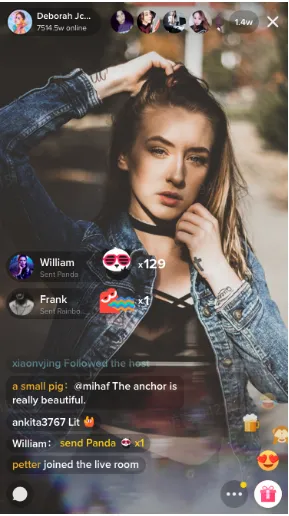
  • 评论:主播可在评论区观看观众评论,并回复观众相关问题。

  • Comments section: streamers can view comments and answer questions from viewers

TikTok直播各界面分别是什么?

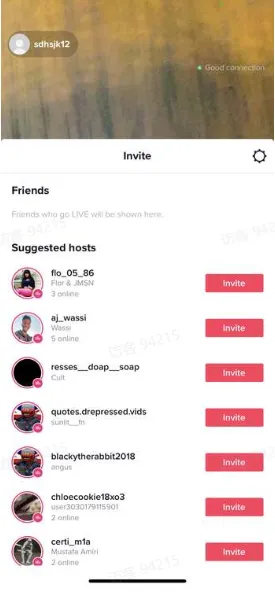
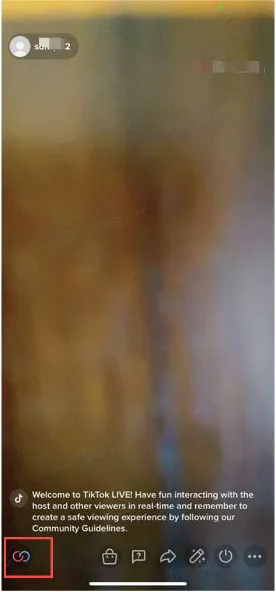
  • 主播连麦:点击直播界面的左下角图标,主播可以邀请另一个主播进行同屏直播。有权限的主播可以向邀请列表中正在开播的好友(互相关注)或推荐主播发送连线邀请对方接受后即可进行同屏直播。

  • Go LIVE with someone: tap the icon in the bottom-left corner of the screen and a window of a list of friends (mutual followers who are going LIVE) and suggested hosts will pop up. Tap "Invite" to send invitations and can go LIVE together when invitations are accepted.

TikTok直播各界面分别是什么?TikTok直播各界面分别是什么?


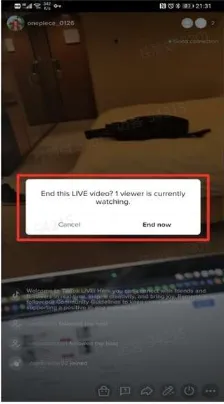
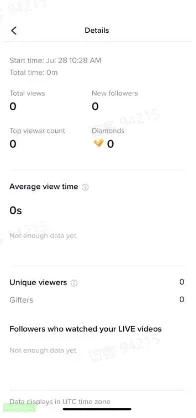
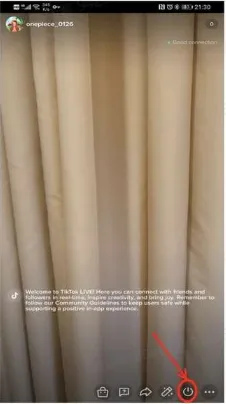
  • 直播结束后,点击关闭标志,确认结束直播。在直播结束后,您可以看到直播的数据统计,如:直播间观看人数,新增粉丝,打赏观众及累计获得打赏。

  • When you are ready to end your LIVE, tap the power button at the bottom. Then tap "End now" to confirm. You will some stats detailing how many people watched, new followers, gifters and the total amount of the gifts

TikTok直播各界面分别是什么?TikTok直播各界面分别是什么?TikTok直播各界面分别是什么?


看播端界面&功能说明 UI and Functions of Viewers

  • 查看主播信息:可点击头像查看主播店铺信息,如:粉丝数、点赞数,并可通过信息卡直接关注主播店铺。

  • View info of streamers' information: tap streamers' profile photos to see detailed information such as how many followers and likes and tap "Follow" to follow the shop

TikTok直播各界面分别是什么?


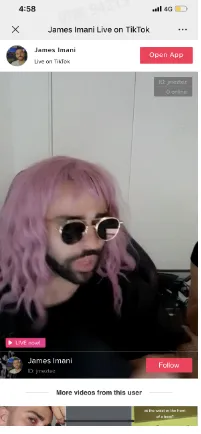
  • 直播间留言区互动:用户可在留言区进行留言和主播进行互动 

  • Comments section: buyers can leave comments in comments section to interact with streamers

TikTok直播各界面分别是什么?


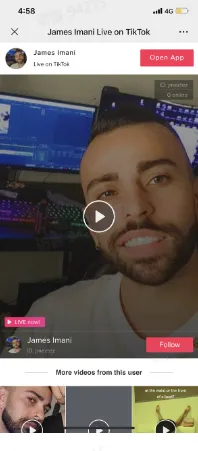
  • 转发直播间:观众可通过分享按钮一键转发直播间至其他社媒平台,如:facebook, whatsapp, snapchat等,

  • Share LIVEs: viewers can tap "Share" to get a link to LIVE and post it on other social media platforms like Facebook, WhatsApp, Snapchat and so on

分享链接/ Share Links

接收者界面/ Tap the link and what you can see

TikTok直播各界面分别是什么?

TikTok直播各界面分别是什么?TikTok直播各界面分别是什么?

  • 直播间送礼物:观众可在直播间通过金币充值购买等值的虚拟礼物,进行主播打赏。

  • Gifting: viewers can purchase virtual coins and exchange them for virtual gifts which can be sent to hosts they like

TikTok直播各界面分别是什么?


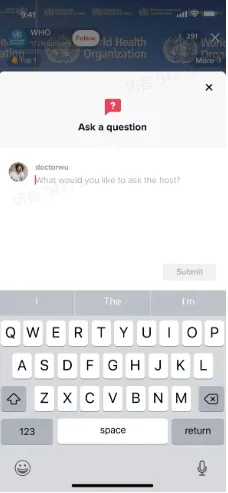
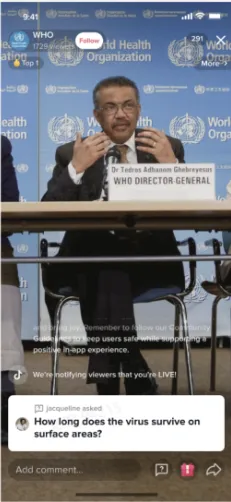
  • 直播间Q&A:用户点击下方问号的图标,可以向主播提问

  • Q&A during LIVE: buyers can hit the icon with question mark to ask questions

TikTok直播各界面分别是什么?TikTok直播各界面分别是什么?TikTok直播各界面分别是什么?


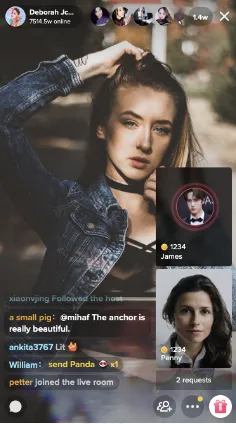
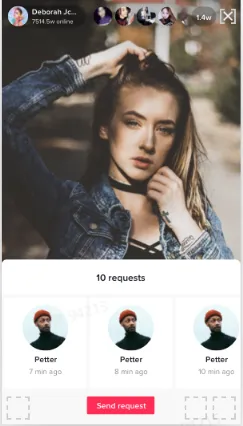
  • 直播间连麦:和主播在线连麦

  • Multi-guest: send voice or video requests

发送连麦申请

预览

连麦成功

TikTok直播各界面分别是什么?

TikTok直播各界面分别是什么?

TikTok直播各界面分别是什么?

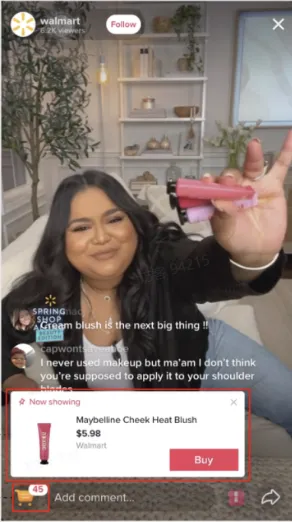
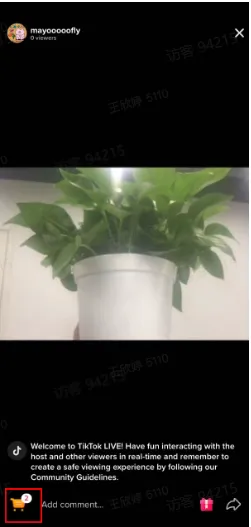
  • 直播间下单/ Place orders:

Step 1: 在直播间左下方找到购物车标志查看直播商品;或者点击商品卡片直接购买正在讲解的商品 Step 1: Hit the icon of shopping care in the bottom-left corner of the screen to view products; or click "Buy" on the card of the product being promoted

TikTok直播各界面分别是什么?TikTok直播各界面分别是什么?


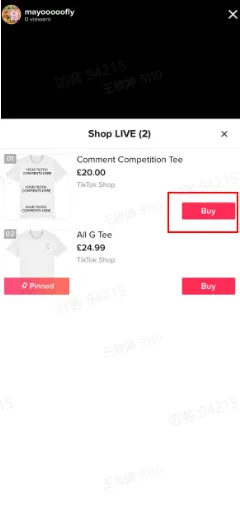
Step 2: 找到对应商品,点击"buy"

Step 2: Select products you want and tap "Buy"

TikTok直播各界面分别是什么?

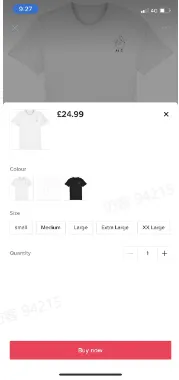
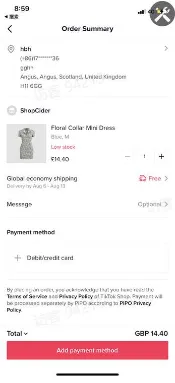
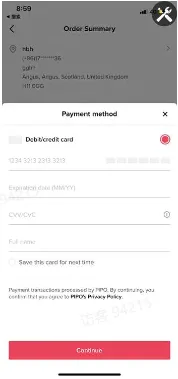
Step 3: 选择对应的产品规格,并点击"buy now"后,填写订单地址和支付方式,订单完成。

Step 3: decide product's specifications like color, size and quantity and tap "Buy now". Then, enter your address and select your payment method to place orders.

TikTok直播各界面分别是什么?TikTok直播各界面分别是什么?TikTok直播各界面分别是什么?TikTok直播各界面分别是什么?


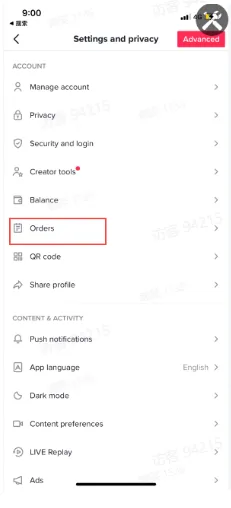
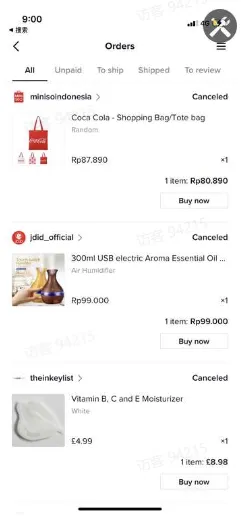
Step 4:点击个人界面的右上角三个点点--点击Orders,则可到达订单中心,查看订单状态和发起售后

Step 4: hit the three dots at the upright corner in the page of "Me"--tap "Orders" to view status of orders or get after-sales services

TikTok直播各界面分别是什么?TikTok直播各界面分别是什么?TikTok直播各界面分别是什么?


  • 购买弹幕:用户进入提单页后,购买弹幕会在主播端及看播端显示"XX is placing an order".(app需要升级到19.9.0版本)

  • Bullet comments of placing orders: when buyers are on the checkout page, a bullet comment will pop up showing "XX is placing an order" on screens of both seller-end and buyer-end. (only available when your app updates to at least version 19.9.0 )

TikTok直播各界面分别是什么?


TikTok广告开户
海外营销广告开户服务,0门槛抢占全球流量!极速开户+优化投流+风险保障+效果跟踪
仅需4步,轻松撬动亿万海外流量,让品牌销量翻倍增长!
已成功开通5000+账户
二维码
免责声明
本文链接:
本文经作者许可发布在TT123跨境头条,如有疑问,请联系客服。
最新热门标签
TikTok美区再出新规,AM或被这两类卖家“内定”
就在上周,TikTok美国业务有了最终的归属。闻此消息的TikTok卖家们,一边细品“靴子落地”后的宁静祥和,一边打开支付软件把未缴的店铺保证金补足,摩拳擦掌规划2026年增长曲线。而另一条来自平台内部的重量级消息,却又将卖家刚补上的“安全感”,瞬间抽走了一半。01TikTok美区再出新规TT123了解到,据内部消息,TikTok美区自2026年起,TikTok美区的AM(客户经理)将停止面向全体商家提供支持,仅专项服务以下两类主体:战略重点商家:须为知名品牌方或其授权经销商,且满足以下任一营收门槛——美国市场全渠道年营收1000万美元,或亚马逊美国单店铺年营收1000万美元。
字节25年利润预计将达500亿美元,TikTok带动增长
AMZ123获悉,近日,据彭博社报道,字节跳动有限公司预计在2025年实现约500亿美元利润,创下公司历史新高。这一表现主要得益于旗下TikTok在电商、直播购物以及海外市场的快速发展。知情人士透露,字节跳动在今年前三季度已实现约400亿美元净利润,超出公司内部对2025年的利润预期,其盈利规模接近美国竞争对手Meta的预期水平(约600亿美元)。尽管TikTok在美国面临严格监管和国家安全审查压力,并促使美方推动对其所有权结构进行重组,字节跳动仍保持快速扩张。
韩妆电商出口额年均增长62.7%,TikTok推动韩流爆火
AMZ123获悉,近日,TikTok披露的多项数据显示,随着TikTok平台上与韩国文化相关内容的持续爆火,进一步推动了韩国品牌的增长。过去三年间,TikTok平台上与韩国流行音乐(K-pop)、韩国美妆(K-beauty)、韩国美食(K-food)等相关的话题标签增长幅度达到1300%,韩国文化内容的全球影响力正在从“被观看”转向“被参与”。TikTok对包括韩国在内的70多个国家数据进行分析后发现,过去三年中新增的韩国文化相关话题内容中,约有一半集中在最近12个月内发布。
TikTok选品核心逻辑...
TikTok电商选品的核心逻辑,是流量适配、用户适配、供应链适配的三重匹配一、 常规选品法:“跟 - 抄 - 超” 三步进阶闭环(一) 跟爆款:借势流量,完成 0-1 生存闭环这是TikTok起店的最优解,核心是对接平台 “流量确定性”,用最低成本跑通 “选品 - 内容 - 出单” 链路。从 TikTok 算法逻辑来看,爆款内容会进入平台的 “流量放大池”,持续推送给兴趣用户。此时跟进同款商品,相当于免费搭乘流量快车,无需额外投流就能获得曝光。实操中,要聚焦近 7 天销量增幅≥50%、上架≤14 天的潜力款,避开红海榜单前五页的饱和商品。
GMV Max素材加热功能!
什么是GMV MAX Creative Boost素材加热功能?
操作够牛!亚马逊大卖拟曲线入主上市公司
跨境电商清洁电器赛道或许很快又有一家龙头企业。
融资1.5亿,美国上流社会疯抢!AI助听器撬动百亿市场
用 AI 技术重新定义“耳朵上的计算平台”。
大面积报错!亚马逊卖家被逼降价......
一边限制发货,一边收低库存费。
TikTok选品核心逻辑...
TikTok电商选品的核心逻辑,是流量适配、用户适配、供应链适配的三重匹配一、 常规选品法:“跟 - 抄 - 超” 三步进阶闭环(一) 跟爆款:借势流量,完成 0-1 生存闭环这是TikTok起店的最优解,核心是对接平台 “流量确定性”,用最低成本跑通 “选品 - 内容 - 出单” 链路。从 TikTok 算法逻辑来看,爆款内容会进入平台的 “流量放大池”,持续推送给兴趣用户。此时跟进同款商品,相当于免费搭乘流量快车,无需额外投流就能获得曝光。实操中,要聚焦近 7 天销量增幅≥50%、上架≤14 天的潜力款,避开红海榜单前五页的饱和商品。
TikTok美区再出新规,AM或被这两类卖家“内定”
就在上周,TikTok美国业务有了最终的归属。闻此消息的TikTok卖家们,一边细品“靴子落地”后的宁静祥和,一边打开支付软件把未缴的店铺保证金补足,摩拳擦掌规划2026年增长曲线。而另一条来自平台内部的重量级消息,却又将卖家刚补上的“安全感”,瞬间抽走了一半。01TikTok美区再出新规TT123了解到,据内部消息,TikTok美区自2026年起,TikTok美区的AM(客户经理)将停止面向全体商家提供支持,仅专项服务以下两类主体:战略重点商家:须为知名品牌方或其授权经销商,且满足以下任一营收门槛——美国市场全渠道年营收1000万美元,或亚马逊美国单店铺年营收1000万美元。
韩妆电商出口额年均增长62.7%,TikTok推动韩流爆火
AMZ123获悉,近日,TikTok披露的多项数据显示,随着TikTok平台上与韩国文化相关内容的持续爆火,进一步推动了韩国品牌的增长。过去三年间,TikTok平台上与韩国流行音乐(K-pop)、韩国美妆(K-beauty)、韩国美食(K-food)等相关的话题标签增长幅度达到1300%,韩国文化内容的全球影响力正在从“被观看”转向“被参与”。TikTok对包括韩国在内的70多个国家数据进行分析后发现,过去三年中新增的韩国文化相关话题内容中,约有一半集中在最近12个月内发布。
字节25年利润预计将达500亿美元,TikTok带动增长
AMZ123获悉,近日,据彭博社报道,字节跳动有限公司预计在2025年实现约500亿美元利润,创下公司历史新高。这一表现主要得益于旗下TikTok在电商、直播购物以及海外市场的快速发展。知情人士透露,字节跳动在今年前三季度已实现约400亿美元净利润,超出公司内部对2025年的利润预期,其盈利规模接近美国竞争对手Meta的预期水平(约600亿美元)。尽管TikTok在美国面临严格监管和国家安全审查压力,并促使美方推动对其所有权结构进行重组,字节跳动仍保持快速扩张。
首页
跨境头条
文章详情
TikTok直播各界面功能分别是什么?
TikTok知识大纲
2025-06-20 10:30
6105

如何开播/How to go LIVE

获取开播权限/ Get access to go LIVE

美国和英国地区的用户,当TikTok账号达到1k粉丝,则可自动获取的开播权限/ For users from US and UK, the access to go LIVE will be automatically granted after the TikTok account gets more than 1k followers.

TikTok手机端开播/ Go Live on TikTok via smartphone 

  • 点击下方中间的“+”进入直播界面,设置直播封面、标题,添加直播话题,点击"Go LIVE"开启手机端直播。

  • Tap the icon "+" at the bottom of the screen. Pick an image, write a title, add hashtags and tap "Go LIVE" to start your stream.
TikTok直播各界面分别是什么?TikTok直播各界面分别是什么?

TikTok OBS开播/ Go LIVE via OBS

OBS开播需要商家联系您的客户经理开通OBS推流权限/ streamers need to contact their account managers to get access to go LIVE via OBS

OBS推流步骤/ Procedures of Starting Streaming

Step1: 下载并安装推流神器 OBS/ Download and install OBS: https://obsproject.com/
TikTok直播各界面分别是什么?

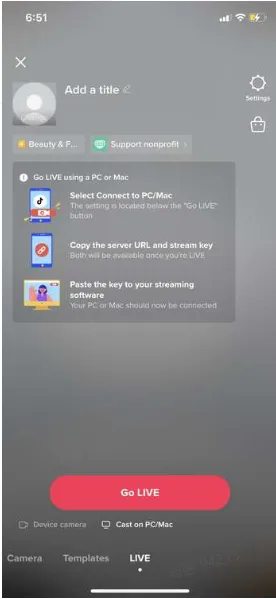
Step 2 : 开播选择"cast on PC/Mac”

Tap "Cast on PC/Mac" before GO LIVE
TikTok直播各界面分别是什么?

复制服务器URL和直播密钥/ Copy the server URL and the stream key
TikTok直播各界面分别是什么?TikTok直播各界面分别是什么?

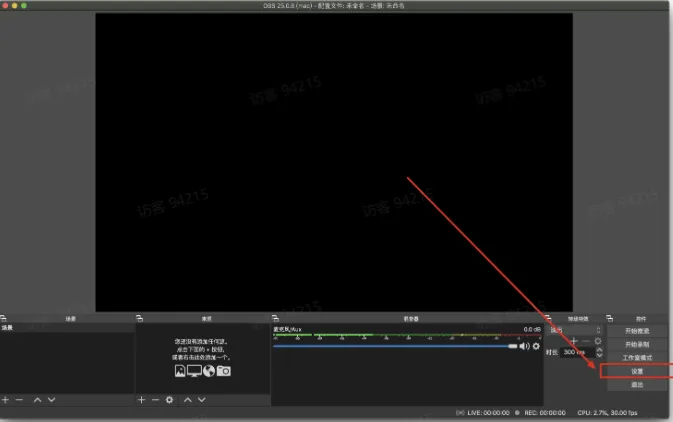
Step 3 : 设置神器推流地址/ Click "Settings" to set the stream RTMP link
TikTok直播各界面分别是什么?

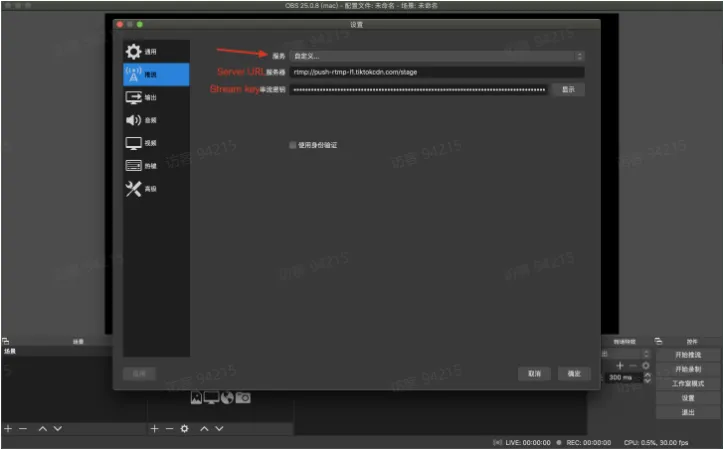
服务选择自定义/ Service: Choose "Custom"

填写刚才复制的 Server URL & Stream key/ Paste copied Server URL and Stream key
TikTok直播各界面分别是什么?

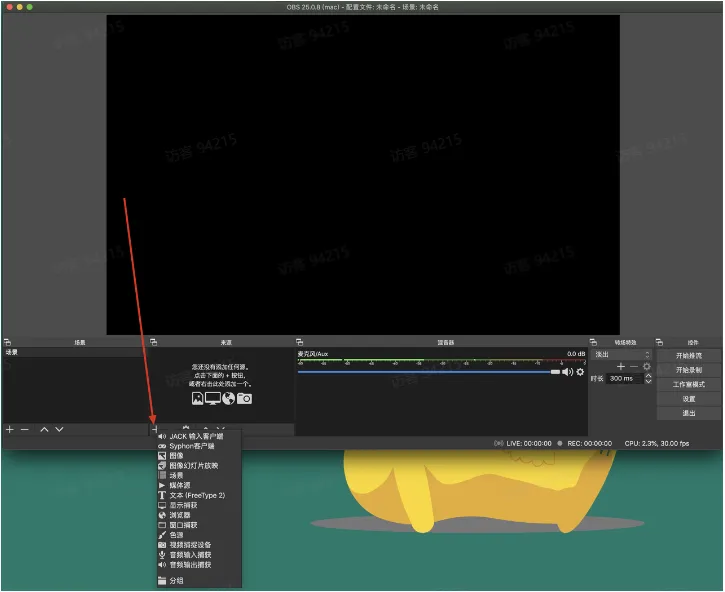
Step 4: 选择推流资源/ Choose sources

可以选择本地视频、图片、屏幕等等/ Can choose from Media Source, Image, Window Capture, etc.
TikTok直播各界面分别是什么?

Step 5 : 开始推流/ Start streaming

TikTok直播各界面分别是什么?

可能遇到问题/ Problems you may encounter

1 未能解析密钥/ Invalid stream key

解决方式 : 重试/ Solution: try again
TikTok直播各界面分别是什么?


主播端界面&功能说明 / UI and Functions of Streamers


开播前和开播中的相关设置 / Settings before LIVE and during LIVE

  • 直播封面和直播标题 /Cover and Titile of LIVE

  1. 开播前主播可通过"take a photo" (拍照)或者"select from library" (从相册中选择) 设置直播封面

  2. 设置好直播封面后,主播可输入直播标题(最长32个字符)

  • Cover and Title of LIVE:

  1. Before LIVE, streamers can set the cover by tapping "take a photo" or "selecet from library"

  2. Then, streamers can write a title (the maximum is 32 characters)

直播标题封面Tips

  • 设置流行或者关键词Hashtag

  • 标题和封面和直播内容相关: 如果您的直播卖美妆但是标题却是3C产品。这种不相关的、具有欺骗性的标题,会引起用户的反感,不利于提升直播间人气。

  • 可以使用表情符号、标点符号 (感叹号等)

  • 突出直播特征,比如名人、美妆博主等 

  • 建立群体标签,用一些关键词与特定的群体联系起来,比如男装专场等

  • 巧用营销词汇: 专场、盛宴、福利、折扣、豪礼、狂欢、限量、限时、超强\值\低\划算


Tips

  • Add trendy hashtags or hashtags of your keywords

  • Titles and covers should be relevant to your LIVE: if you promote beauty products on your LIVE but the title is about 3C products, this may be unpleasant for viewers and undermine your LIVE.

  • Use emojis or punctuation marks (like exclamation mark)

  • Highlight your features such as influencers, beauty blogger and so forth

  • Categorize your LIVE by using some keywords to be associated with certain groups, like Men's Fashion

  • Marketing words: special event, carnival, bonus, discount, gift, festival, limited sales, limited time, highest, lowest, cost-effective
设置直播封面/ Set the cover

设置直播标题/ Write a title

TikTok直播各界面分别是什么?TikTok直播各界面分别是什么?


TikTok直播各界面分别是什么?TikTok直播各界面分别是什么?

  • 镜头翻转:主播可点击屏幕右侧"Flip"选择翻转前后摄像头。

  • Flip the camera: streamers can flip between front and back camera by tapping "Flip"
TikTok直播各界面分别是什么?

  • 视频美颜:主播可选择美颜和滤镜特效。

  • Enhance videos: streamers can enhance the video and add filters
美颜(磨皮/大眼/瘦脸)Enhance (Smooth/Eyes/Face)

滤镜/ Filters

TikTok直播各界面分别是什么?

TikTok直播各界面分别是什么?

  • 视频特效:主播可点击"Effects"选择不同的视频特效。

  • Add effects: streamers can choose from different effects by tapping "Effects"
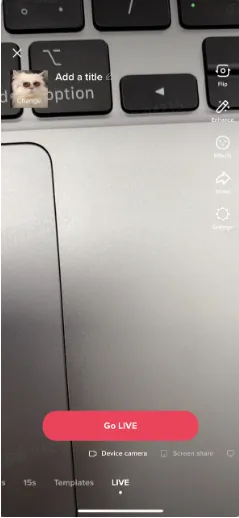
视频特效 Add effects

选择不同的视频特效 Various effects

TikTok直播各界面分别是什么?

TikTok直播各界面分别是什么?

  • 直播间分享:主播可点击"Share"分享直播间至TikTok好友或个人其他社媒主页,如:WhatsApp, Facebook等。

  • Share your LIVE: streamers can tap "Share" to get a link of your LIVE room which can be sent to your TikTok friends or posted on other social media platforms such as WhatsApp, Facebook and so on.
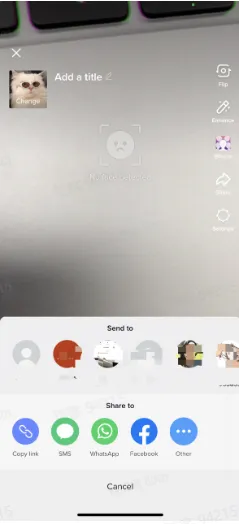
TikTok直播各界面分别是什么?

  • 设置:主播可设置直播间礼物、开启直播间留言及直播间屏蔽关键词,屏蔽词最多可设置200个英文单词;

  • Settings: streamers can tap "Settings" to allow gifts and comments and add any comment filters. The maximum number of comment filters is 200.


  • Moderator场控管理员:主播可以通过设置互粉的好友和观众作为管理员来禁言和拉黑,最多支持设置20个moderators(数值可配置)

  • Moderators: streamers can assign certain mutual followers or viewers to be moderators for managing comments (mute or block)

    • 开播前,点击Settings->Moderators,可指定互粉的好友帮助主播禁言和拉黑;

    • 直播中,点击用户头像,点击右上角的manage,则可以设置直播间的用户为moderator,帮助主播禁言与拉黑;

    • 直播中,针对发表不当言论的用户长按用户头像,点击Mute禁言,则该用户无法再发送评论,点击Block,则该用户无法再进入直播间;

    • Moderators可以针对某个用户进行拉黑/禁言,每次的拉黑/禁言是整体操作,如果需要解禁或者不影响该观众再次进入到主播的直播间,需要去privacy的设置中再次把这位观众释放出来

    • Before LIVE, by tapping on Settings-->Moderators, streamers can assign mutual followers as moderator to help mute or block.

    • During LIVE, by tapping on the viewer's head photo and then clicking on 'Manage' at the upright corner, streamers can assign such viewer as moderator to help mute or block.

    • During LIVE, press and hold users' profile photo and a pop-up will come up. Tap "Mute" to ban users from commenting and tap "Block" to ban users from entering your LIVE.

    • Muting and blocking certain audiences is a one-time operation. The audience will be no longer able to enter the livestreaming unless streamers remove such audience from the privay settings.
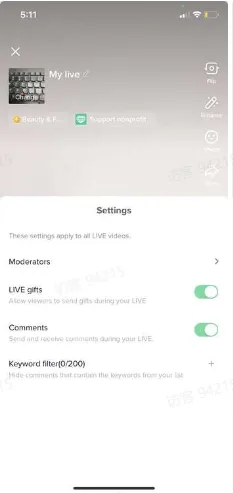
TikTok直播各界面分别是什么?TikTok直播各界面分别是什么?TikTok直播各界面分别是什么?

TikTok直播各界面分别是什么?

  • 直播中回答用户的Q&A:点击下方问号图标,可以查看并回答用户的问题,也可点击右上方的三个点点关闭Q&A。

  • Q&A during LIVE: tap the icon with question mark at the bottom to view and answer questions from buyers. Tap the three dots at the upright corner to turn off Q&A.
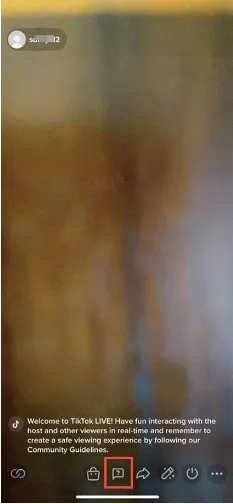
TikTok直播各界面分别是什么?TikTok直播各界面分别是什么?TikTok直播各界面分别是什么?


  • 添加商品功能:支持主播开播前+直播中从TikTok Shop店铺中添加商品

  • Add products: before and during LIVE streamers are enabled to add products from TikTok Shop
  • 评论:主播可在评论区观看观众评论,并回复观众相关问题。

  • Comments section: streamers can view comments and answer questions from viewers
TikTok直播各界面分别是什么?

  • 主播连麦:点击直播界面的左下角图标,主播可以邀请另一个主播进行同屏直播。有权限的主播可以向邀请列表中正在开播的好友(互相关注)或推荐主播发送连线邀请对方接受后即可进行同屏直播。

  • Go LIVE with someone: tap the icon in the bottom-left corner of the screen and a window of a list of friends (mutual followers who are going LIVE) and suggested hosts will pop up. Tap "Invite" to send invitations and can go LIVE together when invitations are accepted.
TikTok直播各界面分别是什么?TikTok直播各界面分别是什么?


  • 直播结束后,点击关闭标志,确认结束直播。在直播结束后,您可以看到直播的数据统计,如:直播间观看人数,新增粉丝,打赏观众及累计获得打赏。

  • When you are ready to end your LIVE, tap the power button at the bottom. Then tap "End now" to confirm. You will some stats detailing how many people watched, new followers, gifters and the total amount of the gifts
TikTok直播各界面分别是什么?TikTok直播各界面分别是什么?TikTok直播各界面分别是什么?


看播端界面&功能说明 UI and Functions of Viewers

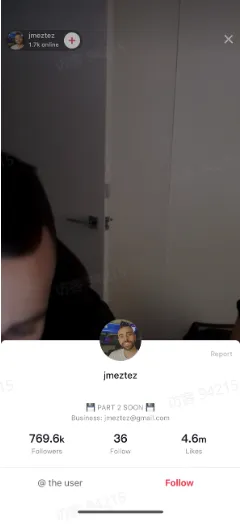
  • 查看主播信息:可点击头像查看主播店铺信息,如:粉丝数、点赞数,并可通过信息卡直接关注主播店铺。

  • View info of streamers' information: tap streamers' profile photos to see detailed information such as how many followers and likes and tap "Follow" to follow the shop
TikTok直播各界面分别是什么?


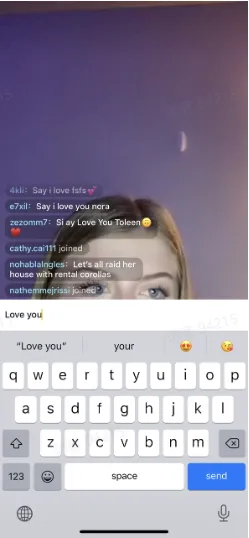
  • 直播间留言区互动:用户可在留言区进行留言和主播进行互动 

  • Comments section: buyers can leave comments in comments section to interact with streamers
TikTok直播各界面分别是什么?


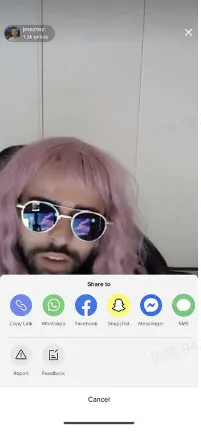
  • 转发直播间:观众可通过分享按钮一键转发直播间至其他社媒平台,如:facebook, whatsapp, snapchat等,

  • Share LIVEs: viewers can tap "Share" to get a link to LIVE and post it on other social media platforms like Facebook, WhatsApp, Snapchat and so on
分享链接/ Share Links

接收者界面/ Tap the link and what you can see

TikTok直播各界面分别是什么?

TikTok直播各界面分别是什么?TikTok直播各界面分别是什么?

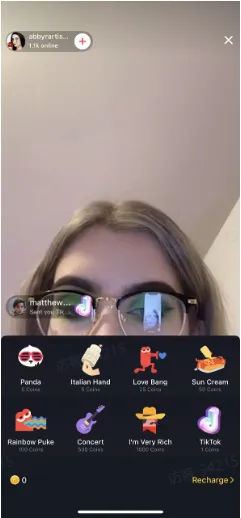
  • 直播间送礼物:观众可在直播间通过金币充值购买等值的虚拟礼物,进行主播打赏。

  • Gifting: viewers can purchase virtual coins and exchange them for virtual gifts which can be sent to hosts they like
TikTok直播各界面分别是什么?


  • 直播间Q&A:用户点击下方问号的图标,可以向主播提问

  • Q&A during LIVE: buyers can hit the icon with question mark to ask questions
TikTok直播各界面分别是什么?TikTok直播各界面分别是什么?TikTok直播各界面分别是什么?


  • 直播间连麦:和主播在线连麦

  • Multi-guest: send voice or video requests
发送连麦申请

预览

连麦成功

TikTok直播各界面分别是什么?

TikTok直播各界面分别是什么?

TikTok直播各界面分别是什么?

  • 直播间下单/ Place orders:

Step 1: 在直播间左下方找到购物车标志查看直播商品;或者点击商品卡片直接购买正在讲解的商品 Step 1: Hit the icon of shopping care in the bottom-left corner of the screen to view products; or click "Buy" on the card of the product being promoted
TikTok直播各界面分别是什么?TikTok直播各界面分别是什么?


Step 2: 找到对应商品,点击"buy"

Step 2: Select products you want and tap "Buy"
TikTok直播各界面分别是什么?

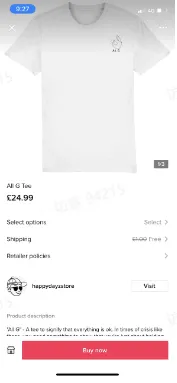
Step 3: 选择对应的产品规格,并点击"buy now"后,填写订单地址和支付方式,订单完成。

Step 3: decide product's specifications like color, size and quantity and tap "Buy now". Then, enter your address and select your payment method to place orders.
TikTok直播各界面分别是什么?TikTok直播各界面分别是什么?TikTok直播各界面分别是什么?TikTok直播各界面分别是什么?


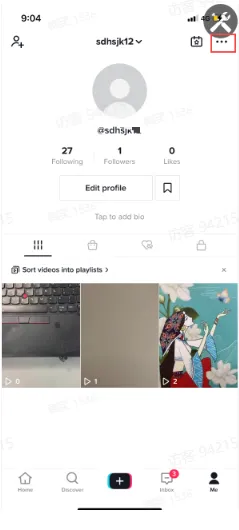
Step 4:点击个人界面的右上角三个点点--点击Orders,则可到达订单中心,查看订单状态和发起售后

Step 4: hit the three dots at the upright corner in the page of "Me"--tap "Orders" to view status of orders or get after-sales services
TikTok直播各界面分别是什么?TikTok直播各界面分别是什么?TikTok直播各界面分别是什么?


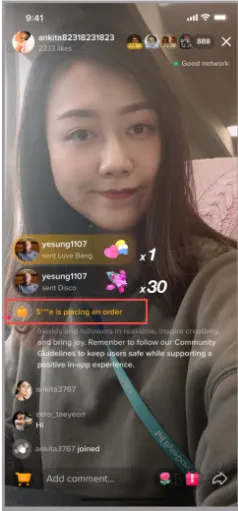
  • 购买弹幕:用户进入提单页后,购买弹幕会在主播端及看播端显示"XX is placing an order".(app需要升级到19.9.0版本)

  • Bullet comments of placing orders: when buyers are on the checkout page, a bullet comment will pop up showing "XX is placing an order" on screens of both seller-end and buyer-end. (only available when your app updates to at least version 19.9.0 )
TikTok直播各界面分别是什么?


咨询
官方微信群
官方客服

扫码添加,立即咨询

加群
官方微信群
官方微信群

扫码添加,拉你进群

更多
公众号视频号跨境资讯
二维码

致力于为TikTok卖家提供一手资讯、干货知识

二维码

致力于为TikTok卖家提供一手资讯、干货知识

二维码

精选今日跨境电商头条资讯

回顶部